
How Do You Track a Budget Against Commitments?
By Wyatt Cooper · Published · 7 min read
Key takeaways
- Committed cost is what you have signed to pay: executed subcontracts and purchase orders plus their approved change orders, on the cost codes in their schedules of values.
- Compare each cost code's revised budget (original plus owner-approved changes) with its committed cost; on a bought-out line the difference is your buyout savings or overrun.
- A line with nothing signed still carries its full budget, and an award that is not signed yet is not a commitment.
- In the worked example, five lines with a $2,207,000 revised budget are 63.5% committed and project $5,550 under, or $750 under once a pending $4,800 change is counted.
To track a budget against commitments, list every cost code with its revised budget (original plus owner-approved changes). Next to it, record what is committed: executed subcontracts and purchase orders plus their approved change orders. On each bought-out line, revised minus committed is your savings or overrun. Lines with nothing signed keep their full budget. Add pending changes as exposure, and review the sheet every time a contract is signed.
Committed cost is the early warning
Committed cost is what you have agreed in writing to spend, and on a commercial job it moves long before actual cost: a $600,000 steel subcontract is signed months before the first dollar is billed against its cost code. Tracking it shows an overrun when the contract is signed instead of when the last pay app arrives. This post covers the commitment side; forecasting cost to complete adds actual cost and the work still to come.
What counts as committed
| Item | Committed? | Why |
|---|---|---|
| Executed subcontract | Yes | Signed by both sides: you owe its schedule of values |
| Executed purchase order | Yes | A signed order for material or equipment |
| Approved change order on a subcontract | Yes | It changes what the signed contract is worth |
| Award letter or verbal award, not yet signed | No | Track it as expected cost, but it can still move or fall through |
| Subcontract out for signature | No | Not binding until it is executed |
| Pending change order request from a sub | No | Exposure: list it beside the line until it is approved or rejected |
| Your own crews and rentals | Usually no | Self-performed cost shows up as actual cost, not as a contract |
- 1Project managerAwards the trade and notes the award amount beside its budget line
- 2Project managerIssues the subcontract with a schedule of values coded by cost code
- 3SubcontractorSigns the subcontract
- 4Project managerMarks it executed: its schedule of values becomes committed cost on those codes
- 5Project managerAdds each approved subcontract change order to the same codes, and lists pending ones as exposure
Steps to set up and keep the sheet
- Start from the budget the job was won with: one line per cost code, from the estimate you carried. See how to set up cost codes.
- Add owner-approved change orders to each line's budget as they are executed, so you compare against the revised budget, not the original.
- When a subcontract or PO is executed, spread its value onto the cost codes in its schedule of values. A contract that covers two codes adds to both.
- Add each approved change order on that contract to its cost code as soon as it is approved.
- For every bought-out line, revised budget minus committed is the buyout variance: positive is savings, negative an overrun.
- For every line with nothing signed, keep the full revised budget as the expected cost until it is bought out.
- List pending change order requests next to their line as exposure, apart from committed cost.
- Review the sheet every time a contract is signed or a change is approved, and at each monthly cost review.
This is the same comparison federal cost guidance makes at the program level: the difference between the estimate at completion and the budget at completion "is the variance at completion, which represents either a final cost overrun or an underrun" (GAO-20-195G). Per cost code, committed cost is the first solid piece of that estimate. Keeping codes in CSI MasterFormat, which CSI describes as "organizing specifications into work results that contractors can price, procure, and build" (CSI), means the estimate, subcontracts and pay apps all land on the same lines.
A worked example: five lines on a fictional medical office
The job is fictional: "Juniper Street Medical Office". Four months after award, three trades are signed and two are not. Plumbing has an owner-approved change of $15,000 and a $9,750 approved change order on the plumbing subcontract.
| Cost code | Revised budget | Committed | Status | Variance (revised − expected) |
|---|---|---|---|---|
| 03 30 00 Cast-in-place concrete | $412,000 | $398,500 | Bought out | +$13,500 |
| 05 12 00 Structural steel framing | $655,000 | $671,200 | Bought out | −$16,200 |
| 09 29 00 Gypsum board | $288,000 | $0 | Awarded at $279,400, not signed | $0 (budget carried) |
| 22 00 00 Plumbing | $340,000 ($325,000 + $15,000) | $331,750 ($322,000 + $9,750) | Bought out | +$8,250 |
| 26 00 00 Electrical | $512,000 | $0 | Bidding | $0 (budget carried) |
| Total | $2,207,000 | $1,401,450 | 63.5% committed | +$5,550 |
The revised budget adds up as $412,000 + $655,000 + $288,000 + $340,000 + $512,000 = $2,207,000, and committed cost as $398,500 + $671,200 + $331,750 = $1,401,450, which is 63.5% of the budget. Expected final cost takes committed cost on the three signed lines and the budget on the two open ones: $398,500 + $671,200 + $288,000 + $331,750 + $512,000 = $2,201,450, or $5,550 under the $2,207,000 budget (+$13,500 − $16,200 + $8,250).
Two numbers stay out of the committed column on purpose. The drywall award of $279,400 would add $8,600 of savings, but it is not signed, so it is noted, not counted. The steel sub has a pending $4,800 change order request; counted as exposure, the job is $750 under ($5,550 − $4,800), and the steel line is the one to manage.
Mistakes that hide an overrun
- Comparing commitments against the original budget, so owner-approved changes look like savings.
- Counting an award or a contract out for signature as committed.
- Booking a whole subcontract to one cost code when its schedule of values covers several.
- Leaving approved subcontract change orders off the committed column until they are billed.
- Reporting buyout savings on signed lines while unbought lines carry plugs that were never tested by bids.
Buyout itself, from scope review to signed subcontract, is covered in how to buy out a construction job; the numbers each line starts from come from the estimate built from sub bids. For the whole GC path through a job, see the general contractor's guide.
How it works in Conflo
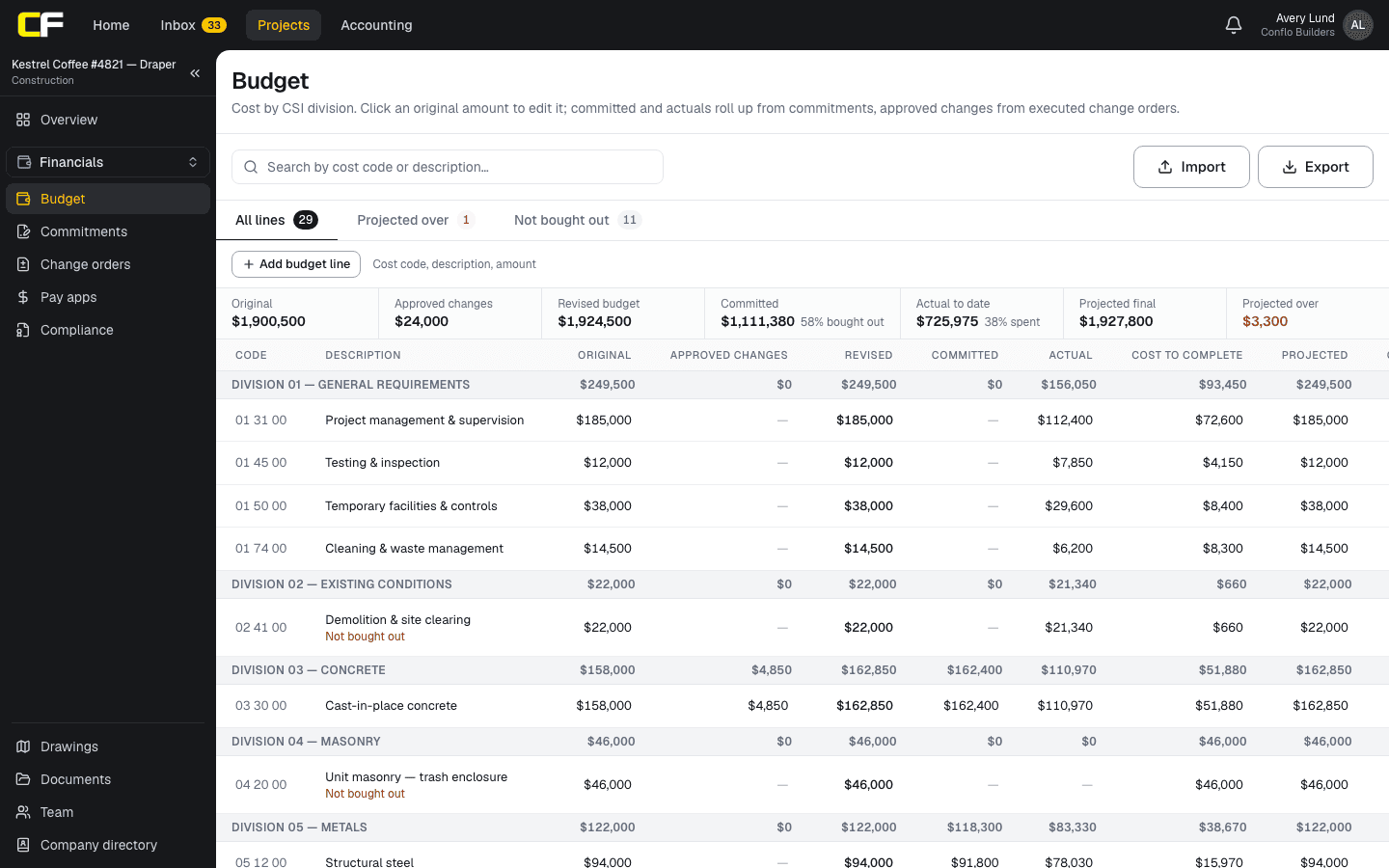
Conflo's Budget lists lines by CSI cost code, grouped by division, with original, approved changes, revised, committed, actual, cost to complete, projected and over/under columns. Committed cost comes from Commitments: once a subcontract or purchase order is executed, its schedule of values counts against the matching cost codes, along with approved change orders on that contract, which count on its first schedule-of-values line's code. Drafts and contracts still out for signature do not count. Executed owner change orders move into the budget's approved changes by cost code.
The summary strip shows the percent bought out, and a Not bought out tab lists codes with no executed commitment (Division 01 is left out, as it is usually self-performed). A code committed with no budget line still shows, marked as committed but not in the budget. Projected cost on each line is the highest of the revised budget, committed and actual cost, so an overrun like the steel line shows as soon as the contract is signed, while savings on a line stay inside its budget until you change it. The budget is visible only to the general contractor.
The bottom line
A budget tracked against commitments tells you at signing, not at closeout, whether a trade fits. Compare the revised budget with executed contracts and their approved changes, keep unsigned lines at budget, and list pending changes as exposure.
Do it every time something is signed. The sheet then shows where the job is likely to land while you can still act.
Sources
- GAO-20-195G, Cost Estimating and Assessment Guide (March 2020) — U.S. Government Accountability Office. Read October 22, 2026.
- Standards overview (MasterFormat and UniFormat) — Construction Specifications Institute. Read October 22, 2026.
Questions
What is committed cost in construction?
The amount you have agreed in writing to pay: executed subcontracts and purchase orders, plus their approved change orders. It is usually known long before it is billed.
Is an awarded subcontract committed?
Not until it is signed. Note the award amount beside the line so you can see the savings coming, but keep the budget as the expected cost until the subcontract is executed.
What is buyout savings?
On a bought-out line, the revised budget minus the committed cost. Whether savings stay with the GC depends on the prime contract: cost-plus and GMP contracts often share or return them. Check your contract.
Where do pending change orders go?
Beside the line as exposure, not in committed cost. Move them into committed cost when they are approved, and drop them if they are rejected.
How often should the budget be compared with commitments?
Every time a contract is signed or a change is approved, and at each monthly cost review. Most of the movement happens during buyout.
Related
Preconstruction
How Do You Buy Out a Construction Job?
Construction buyout step by step: scope review, leveling, award, the subcontract and its exhibits, compliance documents, and savings against budget.
· 7 min read
Money
How Do You Forecast Cost to Complete on a Job?
Forecast cost to complete line by line: remaining commitments, self-performed work at its real production rate, and time-based costs against the schedule.
· 6 min read
Preconstruction
How Do You Set Up Cost Codes for a Construction Job?
Set up construction cost codes from CSI MasterFormat: pick the detail, match codes to bid packages, and use them from estimate to pay app.
· 7 min read
Bidding
How Do You Build an Estimate From Sub Bids?
Build a GC estimate from sub bids: plug each division, carry the leveled bid in place of the plug, add your own work and general conditions, then markups.
· 7 min read
Role hub
The General Contractor's Guide: Bid to Closeout
What a general contractor is responsible for at every phase of a commercial job, from bidding and buyout to RFIs, change orders, pay apps and closeout.
· 8 min read