
How Do You Set Up Cost Codes for a Construction Job?
By Wyatt Cooper · Published · 7 min read
Key takeaways
- Base cost codes on CSI MasterFormat numbers, such as 03 30 00 for cast-in-place concrete, so drawings, specs, bids and costs share one structure.
- Pick the level of detail you will really track: a code per bid package and per self-performed scope is enough on most jobs.
- Use the same code from the estimate line to the budget, the subcontract's schedule of values, the pay app and every change order.
- Keep one standard list for the company, add job codes only when a scope is priced and bought separately, and never reuse a code for something else.
To set up cost codes for a construction job, start from a company list based on CSI MasterFormat: six-digit section numbers such as 03 30 00 Cast-in-Place Concrete, grouped by two-digit division. Use one code for each scope you price and buy separately, usually each bid package and each self-performed scope, plus Division 01 codes for general conditions. Then carry the same codes into the estimate, budget, subcontracts, pay apps and change orders.
Why MasterFormat numbers make good cost codes
A cost code is the label every dollar on the job is filed under. If the estimate, the budget and the subcontracts use different labels, nobody can compare them without a translation sheet. CSI's MasterFormat is the numbering the specifications already use: CSI calls it "the construction industry's standardized language for project documentation" (CSI). Using it for costs means a spec section, the bid package for it and its cost line carry the same number.
MasterFormat numbers come in pairs of digits. "Section numbers can have a minimum of 3 levels (6 digits) to a maximum of 5 levels (10 digits)", and the current system has 50 divisions (WBDG, CSI MasterFormat). The first pair is the division (09 Finishes), the next pairs narrow it (09 29 00 Gypsum Board). For costs, six digits is usually the most detail worth tracking.
How much detail to track
| Level | Example | Fits when | Cost |
|---|---|---|---|
| Division (2 digits) | 26 00 00 Electrical | One sub carries the whole division | Least effort; no detail inside the trade |
| Section (6 digits) | 09 29 00 Gypsum Board, 09 91 00 Painting | Scopes in one division are bid or self-performed separately | The usual choice for a commercial GC |
| Section plus a cost type | 06 10 00 labor, 06 10 00 material | You self-perform and track labor apart from material | More entries for the field and the office to keep straight |
The rule of thumb is to code at the level you buy and manage. Federal cost guidance says the same of any cost breakdown: "Failing to include all work for all deliverables can lead to schedule delays and subsequent cost increases" (GAO-20-195G). Too few codes hide where money goes; too many get coded wrong in the field.
Steps to set up the list
- Start from your company's standard list, built on MasterFormat sections you use often. If you have none, build it from your last three jobs' estimates.
- Add Division 01 codes for general conditions: project management and supervision, temporary facilities, cleaning and waste. See how to price general conditions.
- Match codes to how the job is bought: one code per bid package and per self-performed scope. See how to break a job into bid packages.
- Put every estimate line on a code before the bid goes out, so the budget can be built from the estimate the job was won with.
- Require subcontractors to code their schedule of values lines with your codes, so committed and billed cost land on the right lines.
- Code every change order line, so approved changes move into the right budget line.
- Freeze the job's list at award. Add a code only for a new scope; never rename or reuse one.
A worked example: a cost code list for a fictional clinic
The job is fictional: a single-story clinic. The GC self-performs rough carpentry and buys everything else. This is the list, with the budget each code started with at award.
| Cost code | Title | Bought as | Original budget |
|---|---|---|---|
| 01 31 00 | Project management and coordination | GC staff | $148,000 |
| 01 50 00 | Temporary facilities and controls | GC rentals | $36,500 |
| 01 74 00 | Cleaning and waste management | GC and dumpster vendor | $21,000 |
| 03 30 00 | Cast-in-place concrete | Concrete sub | $186,000 |
| 06 10 00 | Rough carpentry | Self-performed | $58,000 |
| 07 52 00 | Modified bituminous membrane roofing | Roofing sub | $97,500 |
| 08 11 13 | Hollow metal doors and frames | Door supplier (PO) | $32,800 |
| 09 29 00 | Gypsum board | Drywall sub | $142,000 |
| 09 91 00 | Painting | Painting sub | $44,200 |
| 22 00 00 | Plumbing | Plumbing sub | $118,000 |
| 23 00 00 | HVAC | Mechanical sub | $164,000 |
| 26 00 00 | Electrical | Electrical sub | $151,000 |
| Total | $1,199,000 |
The total adds up as $148,000 + $36,500 + $21,000 + $186,000 + $58,000 + $97,500 + $32,800 + $142,000 + $44,200 + $118,000 + $164,000 + $151,000 = $1,199,000. Painting is bid apart from drywall, so it has its own section code; plumbing, HVAC and electrical are each one subcontract, so a division-level code is enough.
- 1EstimatorPrices the drywall package on 09 29 00
- 2Project managerCarries it into the budget at award as 09 29 00 Gypsum board
- 3Drywall subCodes its schedule of values lines 09 29 00 in the subcontract
- 4Drywall subBills against those lines each month on its pay app
- 5Project managerCodes the extra soffit change order 09 29 00, so the change lands on the same line
Mistakes that break the cost report
- Different code lists for the estimate and the job, so the budget cannot be compared with the bid.
- Letting each sub use its own line numbers in its schedule of values.
- A catch-all "miscellaneous" code that ends up holding real overruns.
- Reusing a code for a different scope halfway through the job, so the history means two things.
- Coding change orders to Division 01 instead of the trade they changed.
With codes in place, the budget can be tracked against commitments line by line. For the rest of the GC's preconstruction work, see the general contractor's guide.
How it works in Conflo
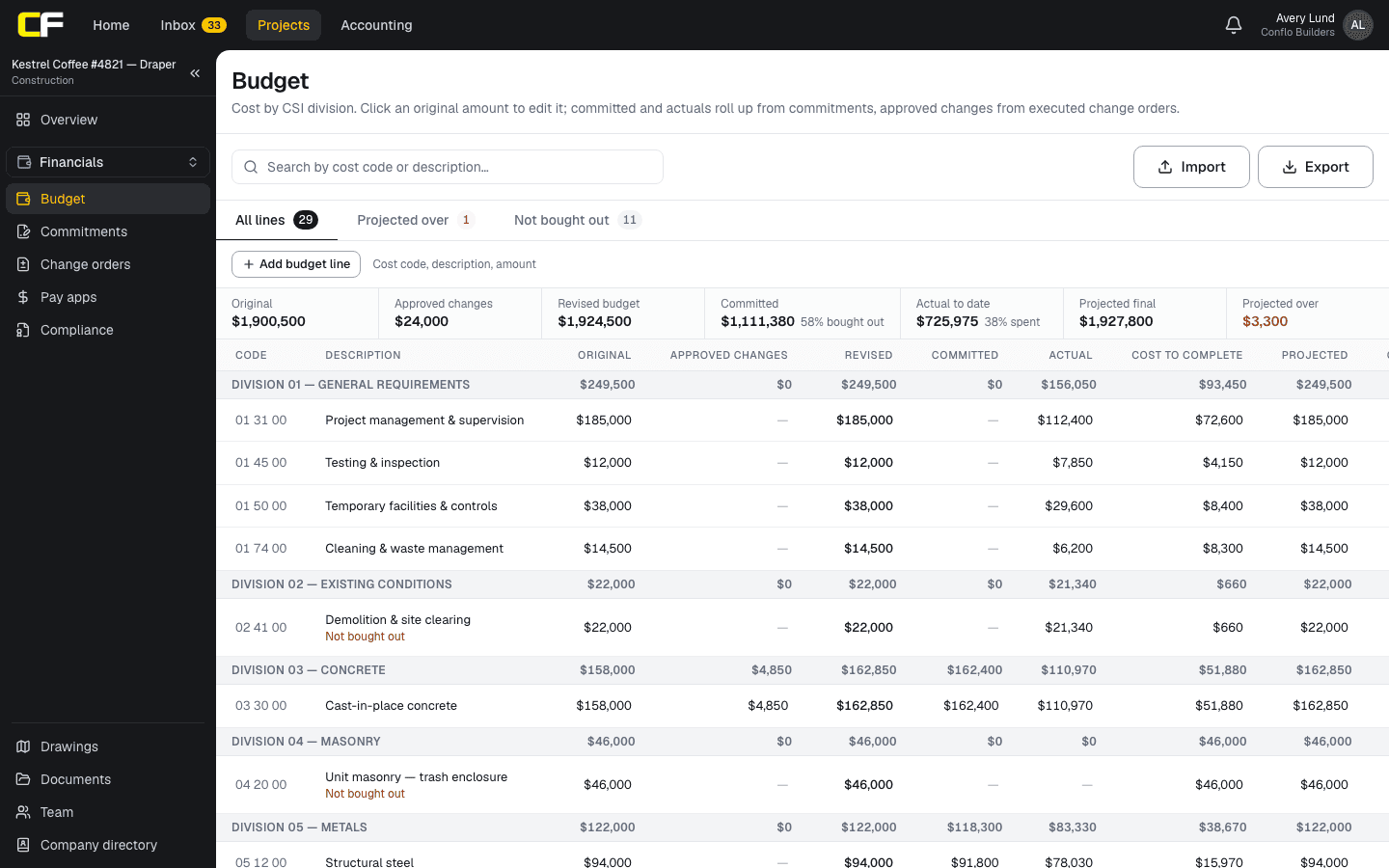
Conflo's Budget keys every line by a cost code and groups lines by CSI division from the first two digits. A code can be typed as 033000, 03-30-00 or just 03, and is stored as 03 30 00 (or 03 00 00). Starting the budget from the Estimate adds one line per estimate division on its division code, such as 26 00 00, at the amount the estimate carries.
Executed subcontracts and purchase orders count against the cost codes in their schedule of values, exactly as each line is coded, and a code that is committed with no budget line still shows, marked as committed but not in the budget. When an owner change order is executed, its cost moves into the approved changes of the line with the same cost code; a code the budget has no line for gets one with a $0 original, so the change is not lost.
The bottom line
Good cost codes are boring: MasterFormat numbers, one per scope you price and buy, used the same way from the estimate to the last change order.
Set the list before the bid goes out and freeze it at award. Every cost report after that depends on it.
Sources
- Standards overview (MasterFormat and UniFormat) — Construction Specifications Institute. Read October 22, 2026.
- CSI MasterFormat (SpecsIntact help) — Whole Building Design Guide, National Institute of Building Sciences. Read October 22, 2026.
- GAO-20-195G, Cost Estimating and Assessment Guide (March 2020), Chapter 7: Work Breakdown Structure — U.S. Government Accountability Office. Read October 22, 2026.
Questions
What are CSI cost codes?
Cost codes built on CSI MasterFormat numbers: a two-digit division (09 Finishes) and pairs of digits that narrow it (09 29 00 Gypsum Board). They match the specification sections, so specs, bids and costs share one structure.
How many cost codes should a job have?
One for each scope you price and buy separately, plus Division 01 codes for general conditions. The fictional clinic above needs 12. Add more only if someone will really track them.
Should subcontractors use my cost codes?
Yes. Put your codes on their schedule of values lines in the subcontract, so their billing and change orders land on your budget lines without retyping.
Can I add a cost code after the job starts?
Yes, for a new scope, such as an added alternate or a new trade. Do not rename or reuse an existing code, or its history stops meaning one thing.
Related
Money
How Do You Track a Budget Against Commitments?
Track a construction budget against committed cost by cost code: revised budget, signed commitments, buyout variance and exposure, with a worked table.
· 7 min read
Bidding
How Do You Break a Job Into Bid Packages?
Split a job into bid packages by trade: start from the CSI divisions, group what one kind of sub performs, and give every boundary item one home.
· 7 min read
Preconstruction
How Do You Build a Schedule of Values?
Split the contract sum into billable lines that follow the work, price each with its share of overhead and profit, and keep closeout real. With an example.
· 7 min read
Bidding
How Do You Price General Conditions?
Price general conditions from the schedule: staff by the weeks on site, facilities by the month, fixed items as lump sums, and a weekly delay rate.
· 7 min read
Role hub
The General Contractor's Guide: Bid to Closeout
What a general contractor is responsible for at every phase of a commercial job, from bidding and buyout to RFIs, change orders, pay apps and closeout.
· 8 min read