
Free Pay Application Template With Schedule of Values
By Wyatt Cooper · Published · 4 min read
Key takeaways
- The workbook has two sheets: a schedule of values billed line by line, and an application summary that calculates retainage, previous payments and the amount due.
- Fill in the yellow cells only; every other figure is a formula, and two checks flag a line billed past 100% or previous payments that don't tie out.
- It comes filled in with a fictional plumbing example, $41,422.50 due on the third pay app, so you can see each column at work before you replace it.
This free pay application template is an Excel workbook with a schedule of values sheet (scheduled value, previous applications, this period, materials stored, completed to date, percent, balance and retainage per line, plus change-order lines) and a summary sheet that calculates the contract sum to date, retainage, earned less retainage, current payment due and balance to finish. It uses its own layout. Download it with no email address, replace the example, and check that your contract accepts the format.
Pay application workbook (Excel)
Download (XLSX, no email needed)What is in the workbook
- Schedule of values sheet: ten base-contract lines and three change-order lines, each with scheduled value, from previous applications, work this period, materials presently stored, completed and stored to date, percent complete, balance to finish and retainage for reference.
- Application sheet: project, parties, application number, period, retainage rate and previous payments, then the nine summary lines from original contract sum to balance to finish.
- Checks: a cell that flags any line billed past its scheduled value, and one that confirms the amount due equals this period's work and stored materials less this period's retainage.
- Signature lines for the contractor and for whoever approves the payment.
Retainage on the summary is rounded once, on the total, to the cent. The per-line retainage column is for reference and can differ from the summary by a cent from rounding.
How to fill it in each month
- First month only: type your approved schedule of values into the Item, Description and Scheduled value columns, and set the retainage rate.
- Each month, copy last month's "Completed and stored to date" into "From previous applications", then clear this period's work and stored materials.
- Enter work completed this period and materials stored on site (or off site, if your contract allows it) for each line.
- Add each approved change order as a new line in the change-order block. Leave pending changes off.
- On the Application sheet, enter previous payments: the total earned less retainage on your last application.
- Check the two check cells, attach the lien waivers and backup your contract asks for, sign and send.
Step-by-step guidance for each line: how a subcontractor fills out a pay application. If you're the GC checking one, see how to review a subcontractor's pay app.
The example it ships with
The example is a fictional $240,000.00 plumbing subcontract with one $4,850.00 change order, on its third pay application at 10% retainage: $118,825.00 completed and stored to date, $11,882.50 retained, $106,942.50 earned less retainage, $65,520.00 previous payments and $41,422.50 due. Every formula was checked against those hand-worked figures.
Your contract decides the form. Some owners require their own forms or the AIA documents; the AIA notes that its G702 is designed for a contractor with a direct agreement with the owner (AIA G702 summary), and owner specifications often add notarization, waivers and stored-material documents (University of Houston, Section 01 29 00). Use this workbook where a contractor-prepared form is accepted.
How it works in Conflo
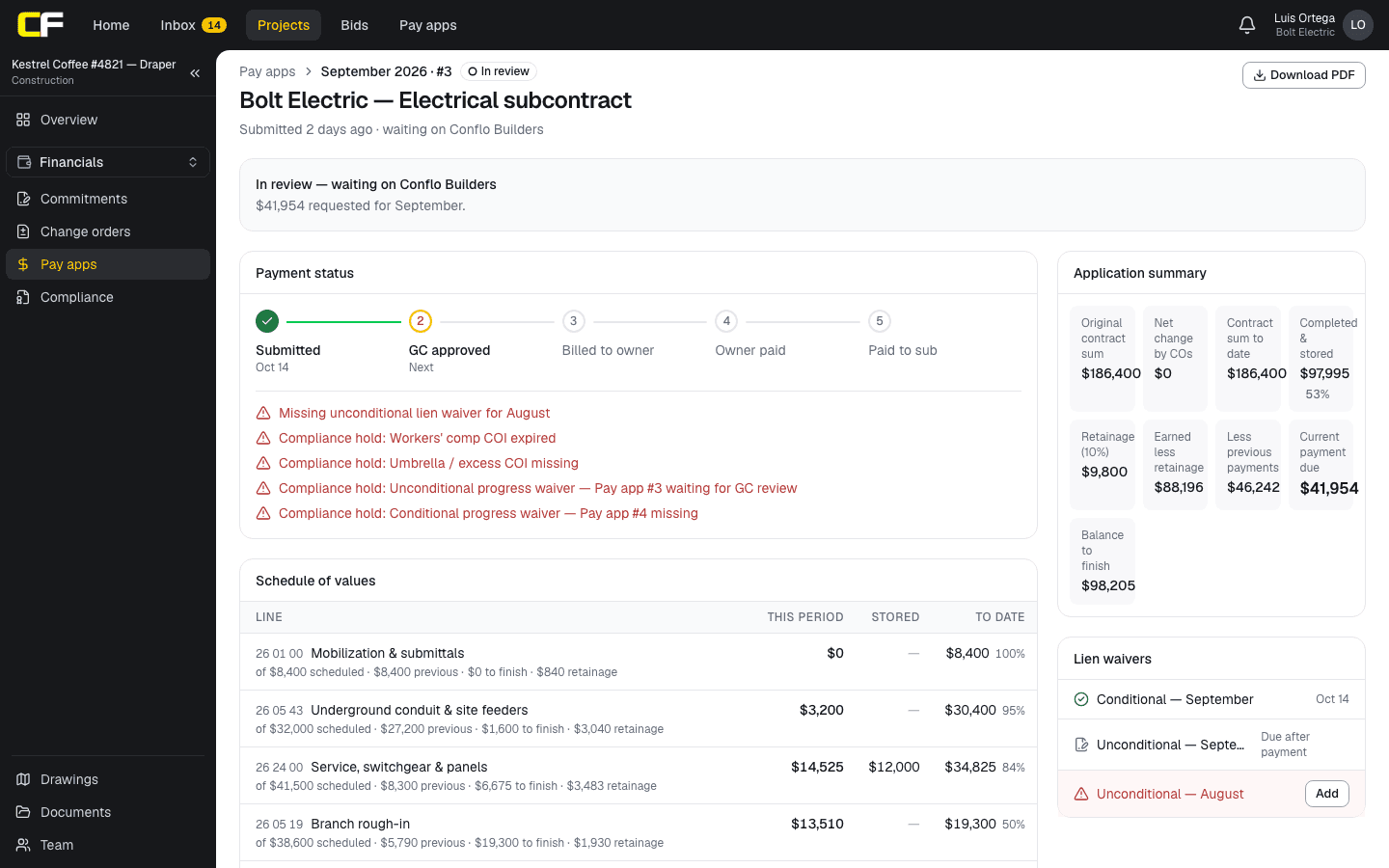
On Conflo's pay apps, the same figures are calculated for you from the schedule of values and earlier pay apps: a sub enters percent complete and stored materials per line, the GC reviews it, and approved billing rolls into the owner pay app.
The bottom line
A pay application is the same arithmetic every month; a workbook that does it and checks it saves the errors that send a pay app back.
When you're ready to stop copying columns month to month, join the waitlist.
Sources
- Summary: G702–1992, Application and Certificate for Payment — AIA Contract Documents (The American Institute of Architects). Read October 16, 2026.
- Section 01 29 00, Payment Procedures (master construction specification) — University of Houston, Facilities Planning and Construction. Read October 16, 2026.
Questions
Is this an AIA G702 and G703?
No. It is Conflo's own layout with the same kinds of figures: a summary and a line-by-line schedule of values. If your contract requires the AIA forms, use those.
Does the template handle stored materials?
Yes. Each line has a materials presently stored column, which counts toward completed and stored to date and carries retainage.
How do I add a change order?
Add it as a new line in the change-order block once it is approved, with its value in the scheduled value column. The summary picks it up as net change by change orders.
Do I need to give an email address to download it?
No. The download link is the file itself.
Related
Money
How Does a Subcontractor Fill Out a Pay Application?
A subcontractor's pay app bills percent complete and stored materials per schedule-of-values line, less retainage and prior payments, with a lien waiver.
· 9 min read
Preconstruction
How Do You Build a Schedule of Values?
Split the contract sum into billable lines that follow the work, price each with its share of overhead and profit, and keep closeout real. With an example.
· 7 min read
Definition
What Is a Pay Application in Construction?
A pay application is a contractor's monthly request for payment against the schedule of values, less retainage and earlier payments. With an example.
· 3 min read
Template
Retainage Calculator for Pay Applications
Free retainage calculator: enter work to date and the rate to get retainage held, previous payments and the amount due, including a rate reduction.
· 3 min read
Role hub
The Subcontractor's Guide: Bidding to Getting Paid
Every step of a commercial job from the subcontractor's seat: bidding, the subcontract, submittals, RFIs, change orders, pay apps, retainage and closeout.
· 9 min read