
Retainage Calculator for Pay Applications
By Wyatt Cooper · Published · 3 min read
Key takeaways
- Retainage is the rate times everything completed and stored to date, rounded to the cent; this period's retainage is that figure minus the same figure on the last pay app.
- Enter a different rate for the last pay app to see a reduction: retainage held this period goes negative, and that amount is released.
- The calculator runs in your browser and sends nothing anywhere; the Excel version does the same arithmetic offline.
This retainage calculator works out one pay application's retainage. Enter work completed and stored to date on this pay app and the last one, and the retainage rate. It returns retainage held to date, total earned less retainage, previous payments, current payment due and retainage held or released this period. Enter the last pay app's rate as well to see a reduction, such as 10% dropping to 5% at 50% complete.
Retainage calculator (Excel)
Download (XLSX, no email needed)Retainage calculator
This pay app, including stored materials
Blank on the first pay app
From your contract
Blank if it hasn't changed
- Retainage held to date
- $0.00
- Total earned less retainage
- $0.00
- Less previous payments
- $0.00
- Current payment due
- $0.00
- Retainage held this period
- $0.00
How the calculator works it out
- Retainage held to date = completed and stored to date × rate, rounded to the cent.
- Total earned less retainage = completed and stored to date − retainage held to date.
- Previous payments = last pay app's completed and stored to date − its retainage at last pay app's rate.
- Current payment due = total earned less retainage − previous payments.
- Retainage held this period = retainage held to date − retainage held on the last pay app (negative means released).
Previous payments here assume earlier pay apps were paid as billed. If your last certificate was for a different amount, use that figure instead. The arithmetic is explained in full in how to calculate retainage.
Try it with the example
Enter $302,118.60 to date, $231,906.80 on the last pay app, 5% now and 10% last time. You should see retainage held to date of $15,105.93, previous payments of $208,716.12, $78,296.55 due, and $8,084.75 released this period. Those figures come from the third pay app in the fictional example in how to calculate retainage.
Sources for those limits: FAR 32.103 and Texas Government Code § 2252.032. What retainage is: the definition. Getting it paid at the end: how a subcontractor gets retainage released.
How it works in Conflo
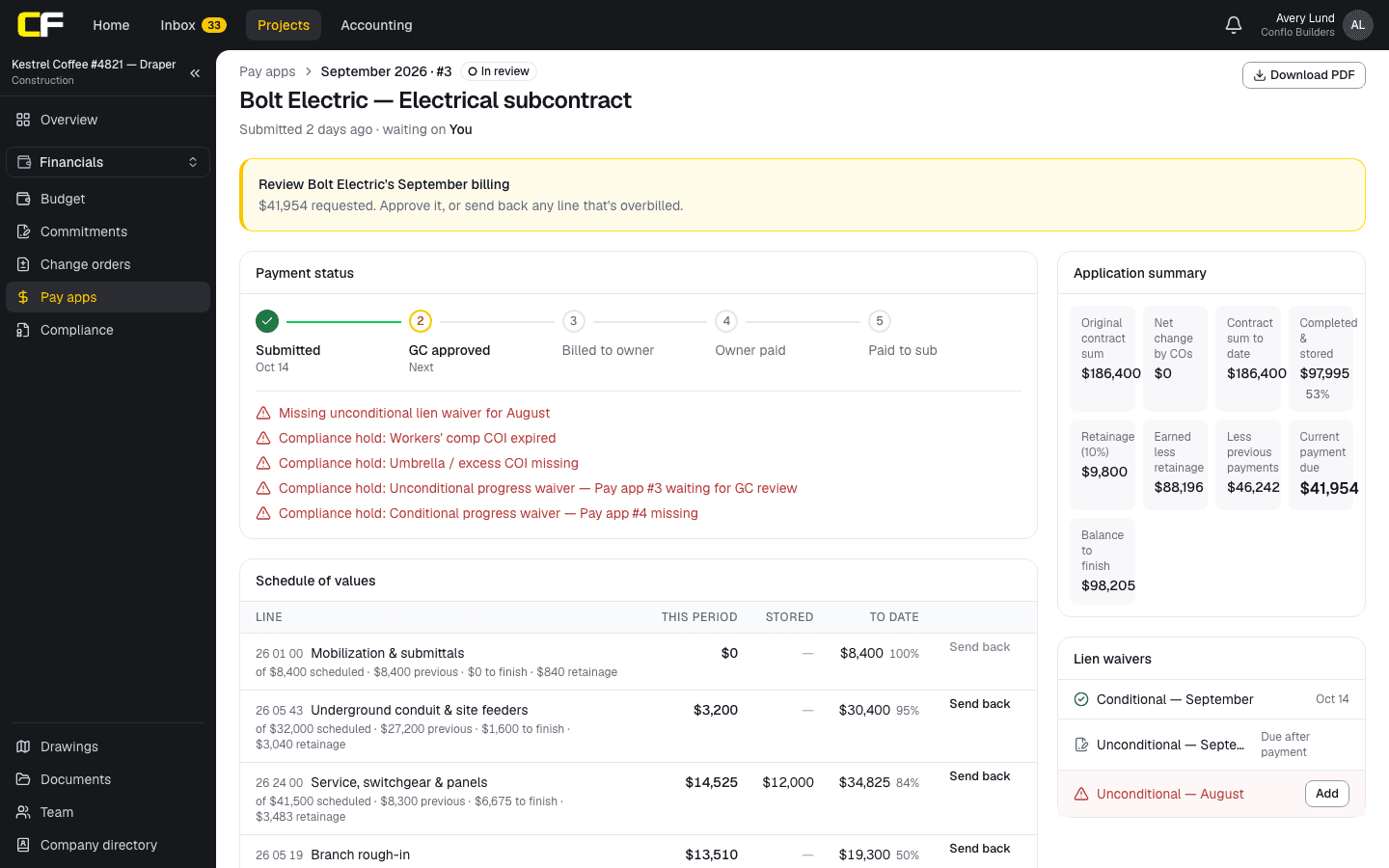
On Conflo's pay apps, this arithmetic runs on every pay app: retainage at the contract's percentage on work completed and stored to date, rounded once on the total and spread across the lines so they add up to the summary. A rate reduction partway through a job is not built yet.
The bottom line
Retainage arithmetic is short, but a cent off in month one is a cent off every month after. Work it on totals to date and it stays right.
If you're a subcontractor tracking retainage across jobs and GCs, join the waitlist.
Sources
- FAR 32.103, Progress payments under construction contracts — Acquisition.gov, U.S. General Services Administration. Read October 16, 2026.
- Texas Government Code § 2252.032, Retainage — Texas Legislature. Read October 16, 2026.
Questions
How do you calculate retainage on a pay app?
Multiply work completed and stored to date by the retainage rate and round to the cent. Subtract it from the to-date total, then subtract previous payments to get the amount due.
Is retainage calculated on stored materials?
Usually, because stored materials are part of completed and stored to date. Some contracts set a different rate for them; this calculator uses one rate.
How do I show a retainage reduction?
Enter the new rate as this pay app's rate and the old one as the last pay app's rate. Retainage held this period then shows the amount released.
Related
Money
How Do You Calculate Retainage on a Pay App?
Retainage is a percentage of work completed and stored to date, held back each pay period. How to calculate it, reduce it, release it, with an example.
· 9 min read
Definition
What Is Retainage in Construction?
Retainage is a percentage of each construction progress payment held back until the work is complete. Definition, an example, and how it differs.
· 3 min read
Money
How Does a Subcontractor Get Retainage Released?
Finish your scope, close your punch items, send closeout documents and a written release request with the waiver asked for, and know your state's deadline.
· 6 min read
Template
Free Pay Application Template With Schedule of Values
A free Excel pay application: a summary sheet and a schedule of values with change orders, stored materials and retainage, calculated. No email needed.
· 4 min read
Role hub
The Subcontractor's Guide: Bidding to Getting Paid
Every step of a commercial job from the subcontractor's seat: bidding, the subcontract, submittals, RFIs, change orders, pay apps, retainage and closeout.
· 9 min read