
How Should an Owner Review a Change Order?
By Wyatt Cooper · Published · 8 min read
Key takeaways
- Review a change order in four passes: is it really a change, is the direct cost right, are the markups the ones the contract allows, and are the days real.
- GSA's cost policy has its estimator price a change before the contractor's proposal comes in, to the same level of detail, and review each cost for accuracy, reasonableness and allowability.
- Ask for the credit for deleted work: a change that swaps one item for another should be priced as the new work minus the old.
- In the worked example, the owner's review takes a $17,125.80 change order to $11,549.66 by applying the contract's 5% markup and the credit for deleted fixtures.
To review a change order as an owner, check four things in order. First, that it is a change: the work is not already in the contract documents, and the cause is documented. Second, the direct cost: quantities, rates and quotes you can check, with credits for deleted work. Third, the markups: only the percentages the contract allows, applied once. Fourth, the days: a schedule fragment showing the critical path moves. Then approve, or reject with reasons.
Is it really a change?
Start with the contract documents, not the price. A change order is owed only for work that differs from what the contract required. Ask the architect, or whoever wrote the drawings, whether the work was shown or specified. Then read the cause the contractor gives: an owner request, a design error or omission, a concealed condition, or an RFI answer that changed the design.
Check two more things before pricing. Is the work covered by an allowance already in the contract? Then it is an allowance adjustment, not new money. And did the contractor give notice on time? Federal contracts, for example, allow no adjustment for costs incurred more than 20 days before written notice of a constructive change (FAR 52.243-4); private contracts set their own periods.
Check the direct cost line by line
The best check is your own number. The U.S. General Services Administration's cost policy (P120) has its estimator prepare an independent estimate before a change request goes to the contractor, at the same level of detail as the contractor's proposal, and review the proposal's costs for accuracy, reasonableness and allowability. Most private owners will not go that far on every change, but the method scales: have your architect, cost consultant or owner's representative price the large ones.
- Labor: hours that fit the scope, at rates backed by payroll records, not a round percentage.
- Materials: supplier quotes or invoices, with tax and delivery where they apply.
- Subcontractor work: each sub's own quote, with its breakdown.
- Credits: when work is swapped, the net is the new work minus the deleted work. P120 has its estimator compute the net cost or credit the same way, and counts decreases and increases at their full value when deciding whether a change needs an independent estimate.
Hold the markups to the contract
Your contract's changes article usually states the markups: overhead and profit on the contractor's own work, a lower rate on subcontracted work, and sometimes insurance and bond at cost. Check each percentage against the contract, and check what it is applied to. The two common errors are a self-performed rate applied to a subcontractor's quote, and markup added on top of a sub's quote that already contains the sub's own markup at a rate the contract does not allow.
If your contract is silent on markups, the rate is negotiated, and a published public rate is a reasonable reference. To see how a markup changes the total, try the change order pricing calculator; the contractor's side of the same math is in how to price a change order.
Ask for the schedule logic behind the days
Days cost you money too: extended general conditions, later occupancy, and, if the days are left open, a delay claim later. Ask for the schedule fragment: the activities the change touches, whether they are on the critical path, and the new dates. P120 asks for schedule-related and impact costs to be shown as a separate part of each estimate; ask the contractor to do the same, so you can see what you are paying for time.
If a change has no effect on the critical path, it should carry no days. If it does, approving the days in the same change order as the money settles the question for that change.
A worked example: a fixture swap on a fictional renovation
The job is fictional: "Harbor Point Library Renovation". The owner asks for 18 reading-room light fixtures to be a different model. The GC's change order carries the electrical sub's quote of $14,600.00, a 15% GC markup, 2% for insurance and bond, and 6 days. The fictional contract allows 5% on subcontracted work and insurance and bond at 2%.
| Line | As submitted | After review | What the owner checked |
|---|---|---|---|
| Electrical sub's quote | $14,600.00 | $10,784.00 | Credit for the 18 original fixtures not bought: 18 × $212.00 = $3,816.00 |
| GC markup on sub work | $2,190.00 (15%) | $539.20 (5%) | The contract allows 5% on subcontracted work |
| Subtotal | $16,790.00 | $11,323.20 | |
| Insurance and bond, 2% | $335.80 | $226.46 | 2% × $11,323.20 = $226.464 |
| Change order total | $17,125.80 | $11,549.66 | $5,576.14 less |
| Time | 6 days | 0 days | The schedule fragment shows the fixtures arrive before ceilings close |
Every figure is rounded to the cent where shown: $14,600.00 − $3,816.00 = $10,784.00; 5% of that is $539.20; and $17,125.80 − $11,549.66 = $5,576.14.
Change order 012 — Reading-room fixture change: owner review
- Project
- Harbor Point Library Renovation (fictional)
- Decision
- Returned for revision
- Scope
- Agreed: owner request, not in the contract documents
- Credit
- Show the credit for the 18 base-bid fixtures not purchased ($212.00 each per the sub's submittal pricing)
- Markup
- Contract section on changes: 5% on subcontracted work, not 15%
- Time
- Send the schedule fragment; we see no effect on ceiling close-in
- Next step
- We will approve at $11,549.66 and 0 days on receipt of the revised change order
Approve, reject, or send it back
| Check | Ask for | Common finding |
|---|---|---|
| Is it a change? | The cause, its document, and the architect's view | Work already shown or specified |
| Direct cost | Quotes, crew hours, rates, invoices | Hours or a lump sum with nothing behind them |
| Credits | The cost of any deleted work | An add-only price for a swap |
| Markups | The contract's percentages and what each applies to | Own-work rate on a sub's quote |
| Time | A schedule fragment with the critical path | Days for work with float |
| Running total | Approved and pending changes against your contingency | Pending changes larger than what is left |
Keep a running total of approved and pending change orders against the contingency you set aside. Once a change is executed it raises the contract sum, and the contractor bills it on the next pay application, where retainage is usually held on it too.
How it works in Conflo
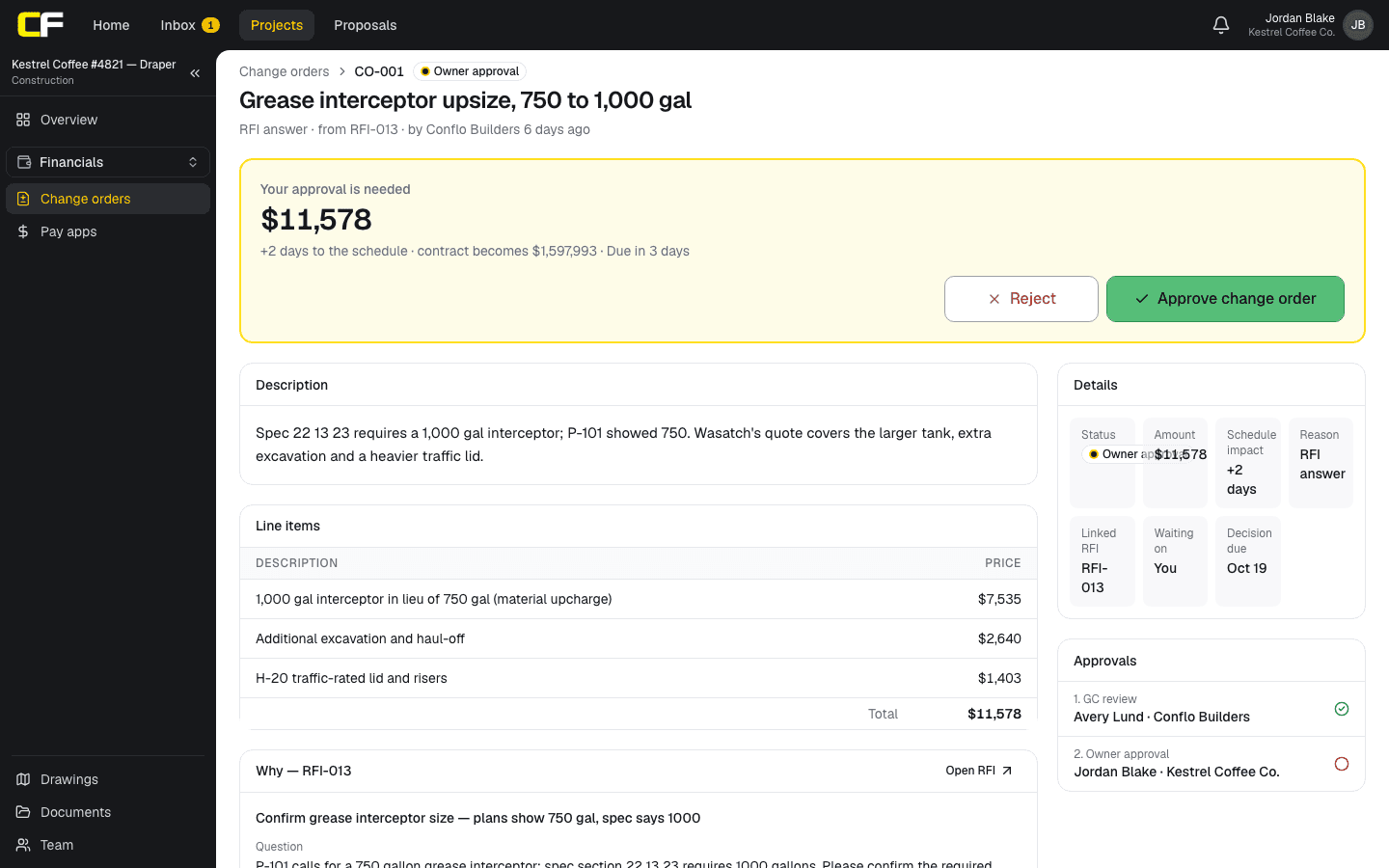
In Conflo the owner sees a change order once the GC sends it for approval: the scope, the reason and the RFI it came from, the schedule days, each line at the owner's price, and the decision due date. The GC's cost codes, cost lines and markup are not shown to the owner, and neither is the cost backup; the Files section is shared with everyone on the change order.
A Contract impact panel shows the original contract, the change orders already approved, this one, what the contract becomes if it is approved and the percent change against the original, and the other change orders still pending. The owner approves in one step, which executes the change order, or rejects it with a reason the GC sees. Limits today: there is no place for the owner's own estimate of the change, and no field for a requested credit; put those in the rejection reason or a file.
The bottom line
An owner's review is four questions in order: is it a change, is the cost right, are the markups the contract's, and are the days real. Ask for the credit when work is swapped, and price the big ones yourself before the contractor's number arrives.
Send back what you cannot check with the reason in writing, and approve the money and the days together.
Sources
- P120, Public Buildings Service Cost and Schedule Management Policy Requirements (GSA Order PBS 1000.6B, November 7, 2022) — U.S. General Services Administration, via the Whole Building Design Guide. Read October 16, 2026.
- FAR 52.243-4, Changes — Acquisition.gov, U.S. General Services Administration. Read October 16, 2026.
Questions
How does an owner check a change order price?
Compare it with your own estimate of the change, or your architect's or cost consultant's, at the same level of detail. Check quantities, labor hours and rates, quotes and invoices, any credit for deleted work, and that each markup is the contract's rate on the right base.
What markup should an owner accept on a change order?
The markup the contract states. Many contracts allow one rate on the contractor's own work and a lower rate on subcontracted work, with insurance and bond at cost. If the contract is silent, the rate is negotiated. Check your contract.
Can an owner reject a change order?
An owner can reject or return a change order request it disagrees with, in writing and with reasons. If the contract lets the owner direct the work before the price is agreed, the owner may issue a change directive instead and settle the price later.
Should an owner approve schedule days on a change order?
Approve days the schedule supports. Ask for a fragment showing the change moves the critical path. If it does, settle the days in the same change order as the money; if the work has float, it should carry no days.
Related
Money
How Do You Price a Change Order?
Price a change order from direct cost (burdened labor, materials, equipment, sub quotes), then the markups and time your contract allows. Worked example.
· 9 min read
Money
How Much Contingency Should an Owner Carry?
Owner contingency in construction: design vs construction contingency, GSA's guidelines (7% new, 10% renovation), and how to size and track yours.
· 7 min read
Definition
Change Order vs Construction Change Directive
A change order is an agreed change in scope, price and time; a construction change directive orders the work before price or time is agreed.
· 4 min read
Money
How Does a Subcontractor Write a Change Order Request?
A sub's change order request: notice first, then scope, priced direct cost, your markup, days and backup the GC can pass to the owner. Worked example.
· 9 min read
Role hub
The Owner's Guide to a Commercial Building Project
The owner's role on a commercial building project, phase by phase: delivery method, choosing the contractor, pay apps, change orders and closeout.
· 7 min read