
How Do You Update a Construction Schedule?
By Wyatt Cooper · Published · 7 min read
Key takeaways
- An update records what happened up to a data date (actual starts, actual finishes, percent complete and remaining duration) and lets the logic move everything after it.
- Take actual dates from the daily reports, so the schedule and the field record agree.
- Compare every update with the baseline, not with last month, and explain each slip on the critical path in a short narrative.
- Leave the logic and original durations alone during an update; a change to either is a revision, said out loud.
To update a construction schedule, pick a data date, then record each activity's actual start and finish, percent complete and remaining working days as of that date, taking the dates from the daily reports. Recalculate, so unstarted work moves with its predecessors. Compare the new dates with the baseline, explain every slip on the critical path in a short narrative, and issue the update at the monthly schedule meeting. Don't change logic or durations quietly while you update.
What an update is, and how often
A schedule is a forecast. An update replaces the forecast with fact up to one day, the data date, and lets the logic recalculate everything after it. The plan you started with, the baseline, stays as it was, so each update shows how far the job has moved from the plan. Building the original is a separate job: see how to build a construction schedule.
Monthly is the norm on commercial work, usually timed with the pay application. The Corps of Engineers' guide specification UFGS 01 32 01.00 10 says to update "monthly at a minimum" (§3.4.3) and to hold the update meeting "at least monthly within five days of the proposed schedule data date" (§3.6.1). Where the federal schedules clause applies, FAR 52.236-15 says the contractor "shall enter the actual progress on the chart as directed by the Contracting Officer". Between monthly updates, the field works from a three-week look-ahead. The general contractor's guide and the project lifecycle show where updates fit in the job.
The update, step by step
- Set the data date: the end of the last working day the update covers.
- Record actual starts and finishes for everything that started or finished, from the daily reports. The guide spec requires the dates to "match the date(s) reported on the Contractor's Quality Control Report" (§3.4.3).
- For each activity in progress, enter percent complete and, separately, the working days it still needs. The two don't have to agree: a pipe run can be 60% installed and still need two days for a retest.
- Leave unstarted activities at their original durations. The guide spec says remaining duration for unstarted work is "not to be less than its original duration" (§3.3.19).
- Recalculate, then look at the critical path. Has it moved? Has float on the near-critical work gone?
- Compare each key date with the baseline and write down the variance in working days.
- Write the narrative: what slipped, why, who is responsible, and what is being done about it.
- Walk the update with the subs and the owner, then issue it with the pay application.
A worked example: the March update
A fictional warehouse, Brightwater Logistics, with the data date at the end of Friday, March 20. Three days of rain held up the footings, and the under-slab plumbing failed its first pressure test. Workdays run Monday to Friday.
| Activity | Baseline | Actual or forecast | Variance | Status at the data date |
|---|---|---|---|---|
| Footings, area A | Mar 2–11 | Actual Mar 2–16 | 3 days late | Complete |
| Under-slab plumbing, area A | Mar 12–17 | Actual start Mar 17, forecast finish Mar 24 | 5 days late | 60% complete, 2 days remaining (retest) |
| Slab on grade, area A | Mar 18–20 | Forecast Mar 25–27 | 5 days late | Not started |
| Site paving | Float 8 days | Float 3 days | 5 days of float used | Not started |
| Substantial completion | Fri May 29 | Forecast Fri Jun 5 | 5 days late | Milestone |
Brightwater Logistics: schedule update narrative, data date March 20
- Critical path
- Unchanged: footings, under-slab plumbing, slab, steel, roof, interiors, substantial completion.
- Substantial completion
- Forecast June 5 against a baseline of May 29: 5 working days late.
- Cause 1
- Rain on March 9, 10 and 11 stopped footing work (daily reports for those dates). Footings finished March 16, 3 days late. A time extension request goes out under the contract's weather provision.
- Cause 2
- Under-slab plumbing failed its pressure test on March 19 (Copper Line Plumbing, inspection report attached). Repair and retest need 2 more working days, adding 2 days to the slip.
- Corrective action
- The slab pour moves to March 25–27. Copper Line Plumbing adds a second crew on March 23 to protect the retest date. Recovery options for the 5 days are being priced.
- Changes this month
- No logic, duration, calendar or lag changes.
Read the numbers against each other. The footings slipped 3 days and the plumbing retest added 2, so the slab and every critical activity after it moved 5 working days. The paving had 8 days of float, so it absorbed the slip and now has 3 left; it isn't late, but it is close to critical. If the 5 days have to come back, the next step is a recovery schedule.
Mistakes that make an update useless
- Updating against last month. A job that slips a day a month looks fine every month; against the baseline it is a quarter late by summer.
- Rolling the baseline forward. Resetting the baseline to today's dates hides every slip. Reset it only when the contract dates change, and keep the old one.
- Letting software fill in actual dates. Enter the dates the work really started and finished, from the field record.
- Percent complete by feel. Base it on installed quantity or earned value, and keep remaining duration as its own estimate.
- No narrative. An owner reads the explanation before the Gantt; a date with no reason starts an argument.
How it works in Conflo
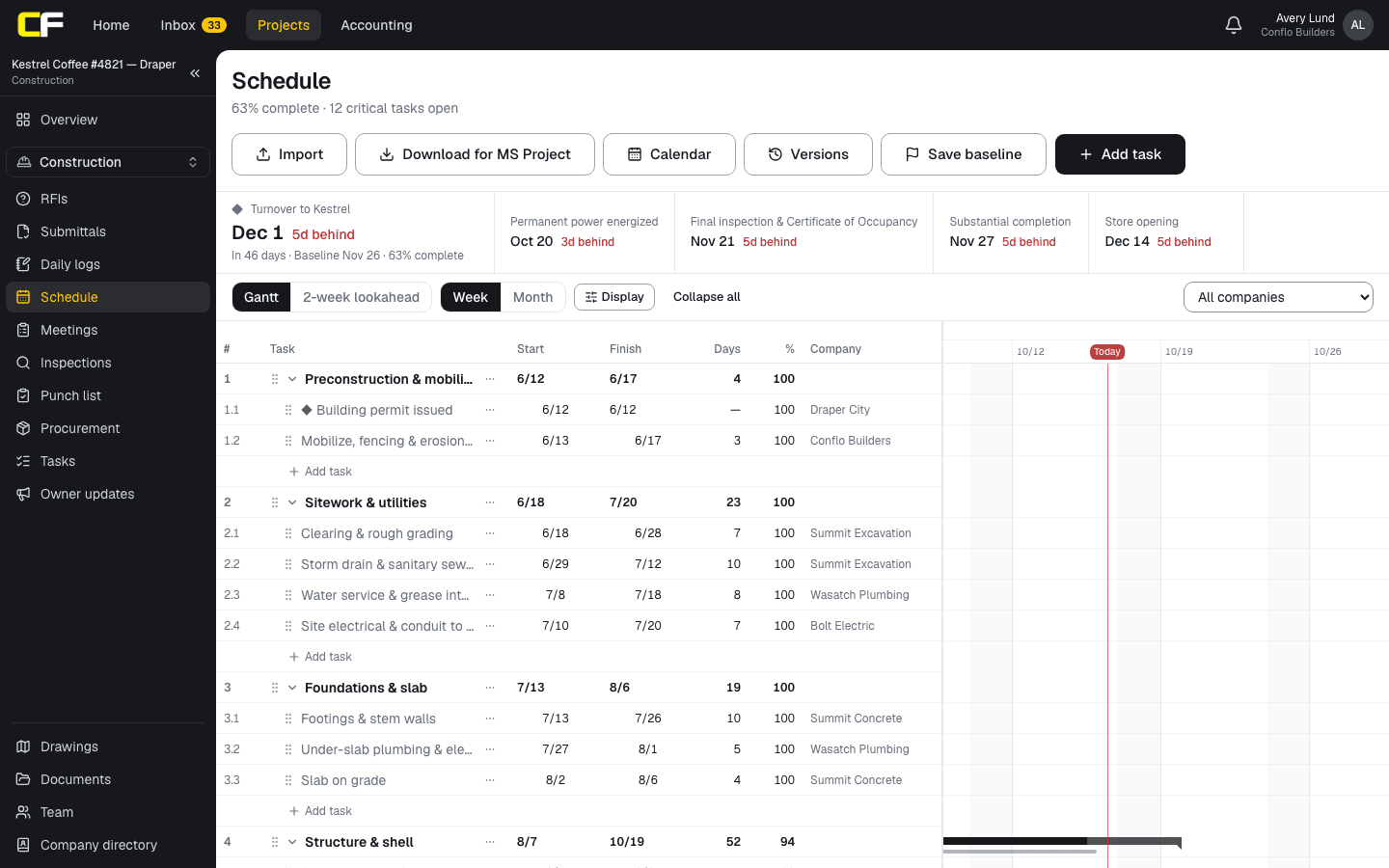
In Conflo's schedule, the GC or the subcontractor doing the work sets each task's percent complete, from the Gantt or from the two-week lookahead. Conflo records the actual start on the day progress first goes above 0% and the actual finish on the day it reaches 100%, so enter progress on the day the work happens. When a predecessor now finishes later, linked tasks that haven't started move later; started work and earlier dates are left to the GC.
After Save baseline, each task shows its baseline bar and how many days it runs late or ahead, and the key dates strip shows each milestone against its baseline. Saving the baseline again replaces it, so save a named version of the schedule at each monthly update instead. There is no separate remaining-duration field: move the task's finish date. Updates are written up outside Conflo.
The bottom line
An update is fact up to a data date: actual dates from the daily reports, percent complete and remaining days, then a recalculation and an honest comparison with the baseline.
Explain every critical slip in a few lines and keep logic changes out of the update, and the owner will trust the dates you give.
Sources
- UFGS 01 32 01.00 10, Project Schedule (August 2026), §3.3.15, §3.3.19, §3.4.3, §3.5.2 and §3.6.1 — U.S. Army Corps of Engineers (Whole Building Design Guide). Read October 22, 2026.
- FAR 52.236-15, Schedules for Construction Contracts — Acquisition.gov (General Services Administration). Read October 22, 2026.
Questions
How often should a construction schedule be updated?
At least monthly on most commercial jobs, usually in step with the pay application. Federal guide specifications ask for monthly updates at a minimum. The three-week look-ahead is updated weekly in between.
What is the data date in a schedule update?
The date the update is true as of. Everything before it is actual: starts, finishes and progress. Everything after it is forecast, calculated from the logic and the remaining durations.
Should I update the baseline every month?
No. The baseline is the plan you measure against. Moving it each month hides every slip. Change it only when the contract dates change, for example after an approved time extension, and keep the earlier one on record.
What goes in a schedule update narrative?
The critical path and whether it changed, the forecast completion against the baseline, the cause of each slip and who is responsible, the corrective action, and any logic, duration or calendar change made.
Who updates the construction schedule?
The GC's scheduler or project manager, with actual dates from the superintendent's daily reports and progress from each subcontractor. The owner and architect review it at the update meeting.
Related
Preconstruction
How Do You Build a Construction Schedule?
Build a commercial construction schedule step by step: activities from the estimate, durations from crew rates, logic, procurement and the critical path.
· 8 min read
Construction
How Does an Owner Read a Construction Schedule?
How an owner reads a contractor's schedule: the Gantt chart, milestones, the critical path, float, the baseline, and what to ask at each update.
· 6 min read
Definition
What Is Float in a Construction Schedule?
Float is how many working days an activity can slip. Total float vs free float, worked on a five-activity network, and who owns the float.
· 4 min read
Construction
How Do You Write a Recovery Schedule?
How a GC writes a recovery schedule: measure the slip, price crews, overtime and resequencing, show the days each recovers, and keep the logic honest.
· 8 min read
Construction
How to Write a Construction Daily Log (With Example)
How to write a construction daily log: what to record each day, a filled-in example, and the habits that make a log hold up in a delay claim.
· 6 min read
Role hub
The General Contractor's Guide: Bid to Closeout
What a general contractor is responsible for at every phase of a commercial job, from bidding and buyout to RFIs, change orders, pay apps and closeout.
· 8 min read