
How Do You Build a Three-Week Look-Ahead Schedule?
By Wyatt Cooper · Published · 7 min read
Key takeaways
- A three-week look-ahead is the next three weeks of the master schedule, broken into pieces a foreman can plan a crew around.
- Every line names a schedule activity, a responsible company, a start, a finish and what must be ready before it can start.
- Federal guide specifications ask for look-ahead activities of five working days or less, with the critical work marked and last week's as-built included.
- Issue it before the weekly subcontractor meeting, walk it line by line, and update it every week.
To build a three-week look-ahead, take every activity in the updated master schedule that runs in the next three weeks, break each into pieces of five working days or less by area or crew, and give each a responsible company, start, finish and the things that must be ready first: submittals, material, inspections, answers, access. Mark the critical work, keep last week's actual dates, issue it before the weekly subcontractor meeting and update it every week.
What a look-ahead is for
The master schedule shows the whole job at the level an owner reads: footings, slab, steel, roof. It can't tell the concrete foreman which area he pours on Thursday or remind the GC that the under-slab inspection has to be booked the day before. The look-ahead does that. It is a short-interval plan, drawn from the master schedule and kept at the level of crews and days.
Public owners put it in the contract. The Navy's guide specification for network schedules, UFGS 01 32 17.00 20, asks for a weekly look-ahead, three weeks by default and four if the field office agrees, as "a more detailed day-to-day plan of upcoming work". Its rules are a good checklist for any job.
| Master schedule | Three-week look-ahead | |
|---|---|---|
| Covers | The whole job, notice to proceed to completion | Last week and the next three weeks |
| Activity size | Often up to about 20 working days (the Corps' UFGS 01 32 01.00 10 caps most at 20) | Five working days or less (UFGS 01 32 17.00 20) |
| Who reads it | Owner, architect, lender, the whole team | Superintendent, foremen, subs' project managers |
| Updated | Monthly, or as the contract says | Every week |
| Shows | Logic, critical path, float, milestones | Crews, areas, days, and what must be ready |
How to build it, step by step
- Start from an updated master schedule. A look-ahead built on last month's dates plans the wrong work.
- Pull every activity that starts, continues or finishes in the next three weeks, and note its schedule ID so each line traces back.
- Break each into pieces of five working days or less: by area, by floor, by pour. The NAVFAC section asks for enough detail "to assign crews, tools and equipment".
- Name the company responsible for each line and its crew size.
- Write what must be ready before each line can start: an approved submittal, material on site, a passed inspection, an answered RFI, access from the trade before it.
- Mark the critical-path work so nobody trades it away for convenience.
- Add the work that isn't on site: submittals going out, shop fabrication, deliveries, inspections and tests, outages and closures.
- Keep last week on the sheet with actual start and finish dates, so the meeting starts from what really happened.
Our free three-week look-ahead template has these columns, the 20 day columns laid out from one Monday, and a filled-in example.
A worked example: week of November 2
A made-up clinic, Harbor Lane, with the foundations under way. The superintendent issues the look-ahead on Friday, October 30, for the three weeks from Monday, November 2. Work days count Monday to Friday.
Harbor Lane Clinic: three-week look-ahead, weeks of November 2, 9 and 16
- Last week (as built)
- 3.1 Footings, area A: Ridgeline Concrete, Oct 26–30, 5 days. Done Oct 30.
- Week 1
- 3.1 Stem walls, area A: Ridgeline Concrete, crew of 6, Nov 2–6, 5 days. Critical. Ready: wall rebar on site, footing inspection passed.
- Week 1 (off site)
- 1.5 Door hardware submittal: Keystone Doors, Nov 2–6. Ready: hardware schedule from the architect. Ten-week lead time after approval.
- Week 2
- 3.2 Under-slab plumbing, area A: Copper Ridge Plumbing, Nov 9–11, 3 days. Critical. Not ready: needs the stem walls backfilled.
- Week 2
- 3.2 Under-slab inspection: city inspector, Nov 12, 1 day. Critical. Book it on Nov 11.
- Week 2–3
- 3.3 Vapor retarder, rebar and slab, area A: Ridgeline Concrete, Nov 13–17, 3 days (Fri, Mon, Tue). Critical. Ready: inspection passed, pump booked, pre-pour meeting held.
- Week 3
- 4.1 Steel delivery and erection, area A: Northgate Steel, Nov 18–20, 3 days. Critical. Ready: shop drawings approved, anchor bolts surveyed, crane permit.
Read down the "ready" column and the week's real work appears: confirm the backfill on Friday, book the inspection on the 11th, chase the steel shop drawings now. Those are the questions for the weekly meeting, and the answers go back on the sheet.
- 1SuperintendentUpdates last week's actual dates and rolls the window forward a week
- 2Subcontractors' foremenSend crew sizes and what they need for the next three weeks
- 3SuperintendentIssues the look-ahead before the weekly meeting
- 4Weekly subcontractor meetingWalks it line by line and clears what isn't ready
- 5Project managerFeeds slips back into the master schedule update
Mistakes that make a look-ahead useless
- Copying the master schedule's 20-day bars. A look-ahead with month-long lines plans nothing.
- Leaving out what must be ready. A line can't start because a submittal isn't back, and nobody saw it coming.
- Building it alone. The foremen know their crews; ask them before you issue it.
- Not feeding it back. If the look-ahead shows the slab a week late, the master schedule should say so at its next update.
- Keeping it only in someone's head. Federal construction contracts that include the schedules clause require a written schedule (FAR 52.236-15); a look-ahead on paper is how the field shares it.
How it works in Conflo
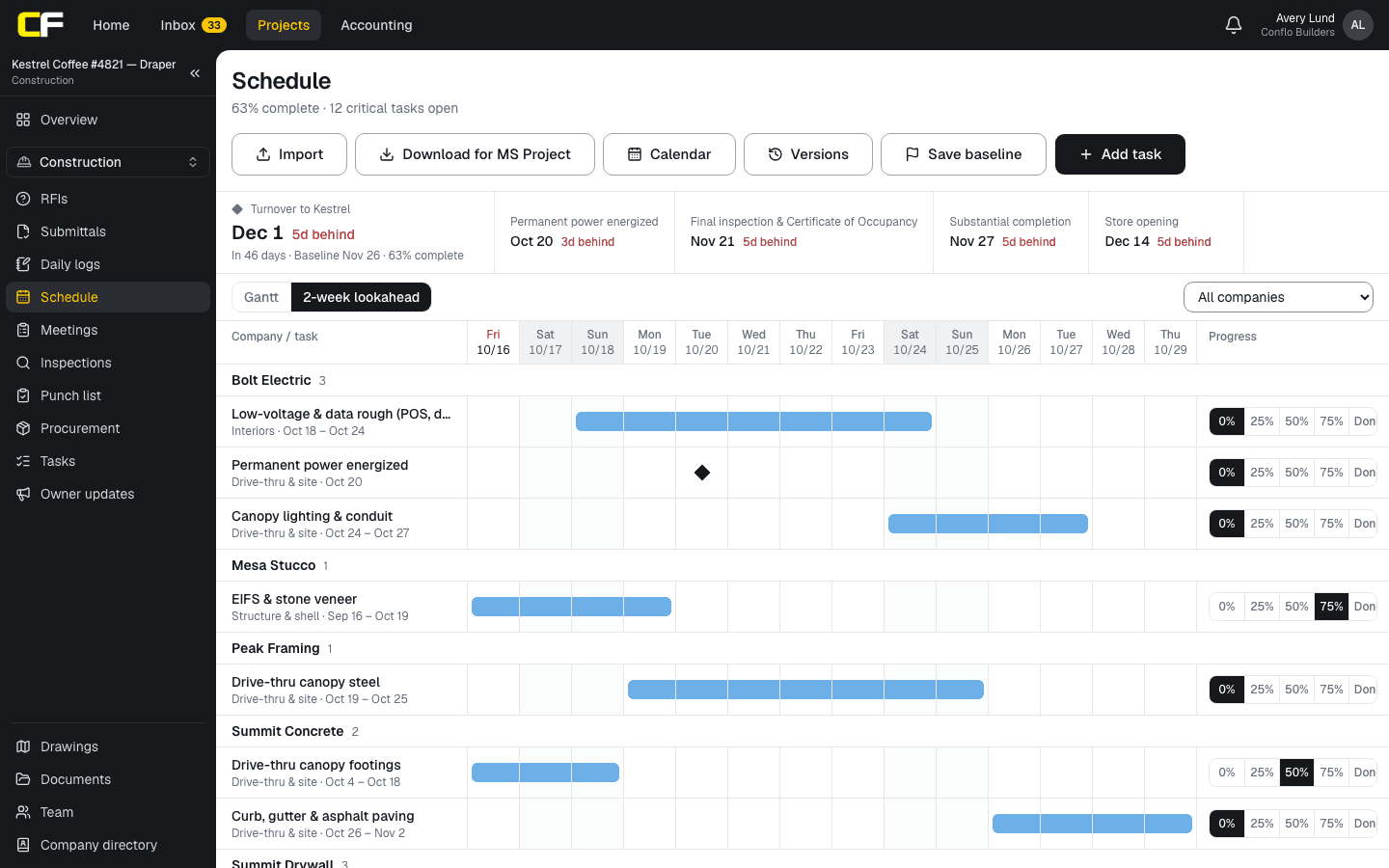
Conflo's schedule has a lookahead view built from the same tasks as the Gantt: the next 14 days from today, grouped by the company responsible, with critical tasks marked. Subcontractors see the whole lookahead, with their own company's work first, and update its progress, so the GC isn't retyping percentages after the meeting.
It is a two-week window, not three, and it has no column for what must be ready. For a three-week look-ahead with make-ready notes, use the Gantt at week zoom or the free template.
The bottom line
A three-week look-ahead turns the master schedule into crew-sized work with its prerequisites written down. Keep lines to five days or less, mark the critical work, and update it every week.
If you are retyping the schedule into a spreadsheet every Friday, put the lookahead where the subs can update their own work.
Sources
- UFGS 01 32 17.00 20, Cost-Loaded Network Analysis Schedules (May 2025), §1.3 Weekly Look Ahead Schedule — Naval Facilities Engineering Systems Command (Whole Building Design Guide). Read October 16, 2026.
- UFGS 01 32 01.00 10, Project Schedule (August 2026), §3.3.2 Activity Durations — U.S. Army Corps of Engineers (Whole Building Design Guide). Read October 16, 2026.
- FAR 52.236-15, Schedules for Construction Contracts — Acquisition.gov (General Services Administration). Read October 16, 2026.
Questions
What is a three-week look-ahead schedule?
A short-interval plan of the next three weeks of work, drawn from the master schedule and broken into pieces of a few days by area and crew, with who does each piece and what must be ready before it starts. It is updated every week.
Who makes the look-ahead?
Usually the GC's superintendent, with crew sizes and needs from each subcontractor's foreman. The project manager checks it against the master schedule and carries any slips into the next update.
Should a look-ahead be two, three or four weeks?
Three is the common choice: long enough to book inspections, deliveries and cranes, short enough to plan by day. The Navy's guide specification defaults to three and allows four. Use what your contract asks for.
Does the look-ahead replace the master schedule?
No. It is derived from the master schedule and kept separately. What changes on the look-ahead goes back into the master schedule at its next update.
How detailed should each line be?
Detailed enough to assign a crew, tools and equipment: one area, floor or pour, five working days or fewer, with a responsible company and a start and finish date.
Related
Template
Free Three-Week Look-Ahead Schedule Template
A free three-week look-ahead schedule template in Excel: last week plus three weeks by day, crews, critical work and what must be ready. No email needed.
· 3 min read
Definition
What Is the Critical Path in Construction?
The critical path is the longest chain of linked activities in a construction schedule. A worked five-activity example, float, and what a delay does.
· 4 min read
Construction
How to Write a Construction Daily Log (With Example)
How to write a construction daily log: what to record each day, a filled-in example, and the habits that make a log hold up in a delay claim.
· 6 min read
Preconstruction
How Do You Set Up a Submittal Log From the Specs?
Build a submittal log from the specs: one row per required item, section by section, with approve-by and submit-by dates worked back from the schedule.
· 10 min read
Preconstruction
How Do You Build a Construction Schedule?
Build a commercial construction schedule step by step: activities from the estimate, durations from crew rates, logic, procurement and the critical path.
· 8 min read
Role hub
The General Contractor's Guide: Bid to Closeout
What a general contractor is responsible for at every phase of a commercial job, from bidding and buyout to RFIs, change orders, pay apps and closeout.
· 8 min read