
How Do You Bill a Change Order on a Pay App?
By Wyatt Cooper · Published · 7 min read
Key takeaways
- Bill only change orders that are executed (signed) by the end of the billing period; leave pending and unsigned ones off the pay app.
- Add each executed change order as its own line on the schedule of values, and add its amount to the contract sum on the summary page.
- Bill a change order by percent complete like any other line; a deduct goes on as a negative line and is usually credited in full once the work is deleted.
- In the worked example, one add billed at 50% and one deduct take the contract sum to $190,364.08 and leave $17,871.34 due after 10% retainage.
To bill a change order on a pay app, wait until it is executed, then add it to the schedule of values as its own numbered line with the change order's amount as its scheduled value, and add the same amount to the net change by change orders on the summary. Bill the line by percent complete like any other. A deduct goes on as a negative line. Retainage usually applies to change order work, and pending changes stay off.
Only executed change orders go on
The general method for a monthly bill is in how a subcontractor fills out a pay application. This post is the change order part of it. The rule that matters most is timing: bill a change only after it is signed. Owner specifications set the cutoff by date. The University of Houston's payment procedures section, for example, says to include amounts of change orders and construction change directives issued before the last day of the construction period covered by the application (Section 01 29 00).
A request you sent, a change the GC says is coming, a T&M ticket not yet in a change order: none of them is billable yet. Keep a log of your change orders with their status, and bill from the executed ones only. If you put a pending change on the pay app, the GC may send the whole application back, and you lose a month on the work that was billable.
Add it as its own line, then update the summary
The same specification says to update and resubmit the schedule of values when change orders change the contract sum, and to include each change order as a new line item (UH Section 01 29 00). A standard continuation sheet breaks the contract sum into portions of the work on the contractor's schedule of values (AIA's G703 summary); an executed change order is a new portion.
| Place | What changes | Rule of thumb |
|---|---|---|
| Schedule of values | A new line: "CO 1: exam room circuits", scheduled value = the change order amount | Number lines by change order so they match the GC's log |
| Net change by change orders | The sum of every executed change order to date, adds minus deducts | It must equal the sum of the change order lines |
| Contract sum to date | Original contract sum plus the net change | Equals the total of the scheduled values |
| Work completed | The change order line billed by percent complete | Bill what is in place, not the whole change at once |
| Retainage | Held on the change order line at the contract's rate, unless the contract says otherwise | Check your retainage clause for changes |
| Balance to finish | Goes up by the unbilled part of the change | A negative line lowers it |
A deduct change order (work deleted from your scope) goes on as a negative line. If the deleted work was never built, credit it in full on the first pay app after it is executed; if part was built, the change order should say what remains. Either way, the net change on the summary includes it as a negative number.
A worked example: one add and one deduct on pay app 4
The job and companies are fictional. "Brightline Electric" has a $186,000.00 subcontract on the "Tamsin Clinic", with 10% retainage. Through pay app 3 it has billed $111,600.00 (60%) of the original lines. This period, base work adds $18,600.00 (10%). Change order 1 (+$6,214.08, exam room circuits) was executed last month and is half done. Change order 2 (−$1,850.00, two fixtures deleted) was executed this month; the fixtures were never ordered. Change order 3 ($4,400.00) is still with the owner, so it is not billed.
| Line | Scheduled value | Previous | This period | Completed to date | Balance to finish |
|---|---|---|---|---|---|
| Original lines (summarized) | $186,000.00 | $111,600.00 | $18,600.00 | $130,200.00 | $55,800.00 |
| CO 1: exam room circuits | $6,214.08 | $0.00 | $3,107.04 | $3,107.04 | $3,107.04 |
| CO 2: two fixtures deleted | −$1,850.00 | $0.00 | −$1,850.00 | −$1,850.00 | $0.00 |
| Totals | $190,364.08 | $111,600.00 | $19,857.04 | $131,457.04 | $58,907.04 |
| Item | Calculation | Amount |
|---|---|---|
| Original contract sum | Original lines | $186,000.00 |
| Net change by change orders | $6,214.08 − $1,850.00 (CO 3 is pending and left off) | $4,364.08 |
| Contract sum to date | $186,000.00 + $4,364.08 | $190,364.08 |
| Completed to date | Schedule of values total | $131,457.04 |
| Retainage (10%) | 10% × $131,457.04 = $13,145.704 | $13,145.70 |
| Earned less retainage | $131,457.04 − $13,145.70 | $118,311.34 |
| Less previous certificates | $111,600.00 − 10% retainage of $11,160.00 | $100,440.00 |
| Current payment due | $118,311.34 − $100,440.00 | $17,871.34 |
| Balance to finish, including retainage | $190,364.08 − $118,311.34 | $72,052.74 |
The check: this period's billing is $18,600.00 + $3,107.04 − $1,850.00 = $19,857.04; retainage on it is $13,145.70 − $11,160.00 = $1,985.70; and $19,857.04 − $1,985.70 = $17,871.34, the current payment due. Change order 1 at 50% is $6,214.08 × 0.50 = $3,107.04. The pay application workbook does this arithmetic if you add the change order lines to its schedule of values.
Pay app 4 — change order lines
- Line 14
- CO 1, exam room circuits; scheduled $6,214.08; 50% this period
- Line 15
- CO 2, two fixtures deleted; scheduled −$1,850.00; credited in full
- Not billed
- CO 3, $4,400.00, waiting on the owner
- Backup
- Signed change orders 1 and 2
Mistakes that get the pay app sent back
- Billing a change order before it is signed, or billing the full amount of a change that is partly done.
- Folding the change into an existing line instead of adding its own, so nobody can match it to the log.
- A net change on the summary that does not equal the change order lines.
- Leaving a deduct off, so the contract sum is too high.
- Not holding retainage on change order work when the contract requires it.
On federal work, the prime contractor's progress payment request itemizes the amounts requested against the elements of the work and lists each subcontractor's work, subcontract total and previous payments (FAR 52.232-5, paragraph (b)(1)). Your change order lines are what lets the GC do that. How retainage on them comes back is in how to get retainage released; the rest of a sub's billing is in the subcontractor's guide and the project lifecycle.
How it works in Conflo
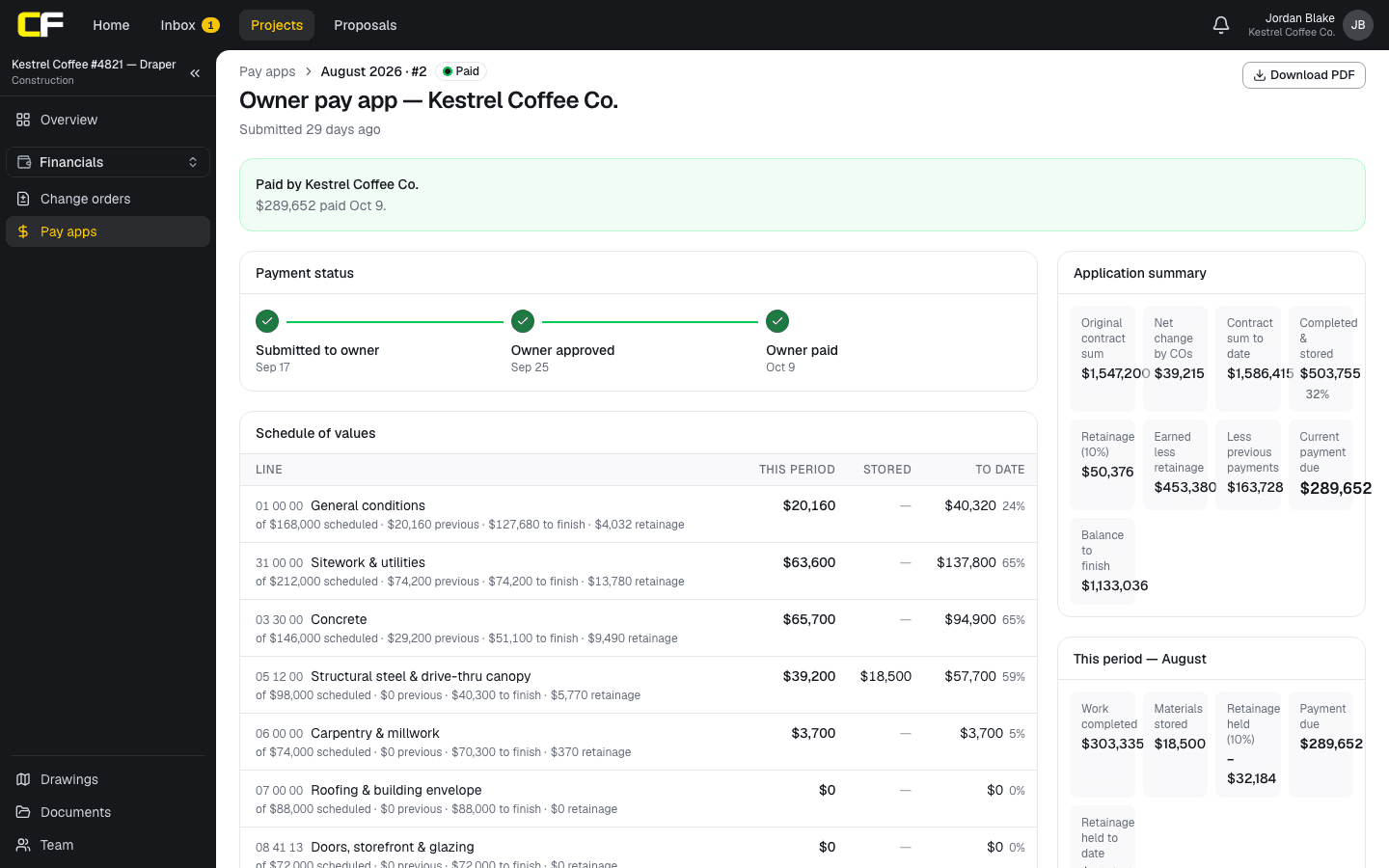
In Conflo, once a change order is executed, its amount is added to the contract sum on every later pay app: the owner's price on the GC's prime contract, and the sub's cost on that sub's subcontract. The application summary shows it as the net change by change orders, and the contract sum to date includes it. Pending change orders are not added.
Limit today: executed change orders are not yet lines on the schedule of values, so a change order's work can't be billed on its own line in Conflo, and no line can bill past 100% of its scheduled value. The pay app PDF says so in a note under the schedule.
The bottom line
Bill a change order only once it is executed, on its own numbered line, by percent complete, with its amount in the net change on the summary. Put deducts on as negative lines, and leave pending changes off.
Reconcile your change order lines with the GC's log every month before you submit.
Sources
- Section 01 29 00, Payment Procedures (master construction specification) — University of Houston, Facilities Planning and Construction. Read October 22, 2026.
- Summary: G703–1992, Continuation Sheet — AIA Contract Documents (The American Institute of Architects). Read October 22, 2026.
- FAR 52.232-5, Payments under Fixed-Price Construction Contracts — Acquisition.gov, U.S. General Services Administration. Read October 22, 2026.
Questions
Can you bill a change order before it is signed?
Usually not. Bill change orders executed by the end of the billing period, as owner specifications such as the University of Houston's require, and bill pending changes once they are signed. Your subcontract decides.
Does a change order go on its own line on the schedule of values?
Yes, as a rule. Add each executed change order as a new numbered line with its amount as the scheduled value, so the GC can match it to its change order log.
How do you bill a deduct change order?
As a negative line with the credit as its scheduled value. If the deleted work was never built, credit it in full on the next pay app; the net change on the summary includes it as a negative amount.
Is retainage held on change order work?
Usually, at the contract's rate, unless the subcontract or the law that applies says otherwise. Check your retainage clause.
Can you bill part of a change order?
Yes. Bill a change order line by percent complete like any other line; bill the whole amount only when the changed work is done.
Related
Money
How Does a Subcontractor Fill Out a Pay Application?
A subcontractor's pay app bills percent complete and stored materials per schedule-of-values line, less retainage and prior payments, with a lien waiver.
· 9 min read
Template
Free Pay Application Template With Schedule of Values
A free Excel pay application: a summary sheet and a schedule of values with change orders, stored materials and retainage, calculated. No email needed.
· 4 min read
Money
How Do You Issue a Subcontract Change Order?
Issue a subcontract change order the sub can sign and bill: what goes on it, the revised subcontract sum, time, and the reservation of claims. Example.
· 8 min read
Money
How Do You Bill for Stored Materials on a Pay App?
Bill delivered but uninstalled materials: the backup owners ask for, on site vs off site, and how stored amounts move to installed work. Worked example.
· 7 min read
Role hub
The Subcontractor's Guide: Bidding to Getting Paid
Every step of a commercial job from the subcontractor's seat: bidding, the subcontract, submittals, RFIs, change orders, pay apps, retainage and closeout.
· 9 min read