
How Does a Subcontractor Keep As-Built Drawings?
By Wyatt Cooper · Published · 6 min read
Key takeaways
- As-built drawings are the contract drawings marked up to show what was really built; they are kept during the job, not drawn at the end.
- Keep one set for markups, update it at least weekly, and record every change the day it happens: RFI answers, change orders, field moves.
- Buried and concealed work needs dimensions to two fixed points and a depth, so someone can find it after it's covered.
- Turn the set in when the closeout log asks, with a short list of what changed; late or thin as-builts can hold up retainage.
A subcontractor keeps as-built drawings by marking up one dedicated set of the current contract drawings as the work goes in: deletions struck through in red, additions in green, notes in blue. Record every RFI answer, change order and field change the day it happens, dimension buried and concealed work to two permanent points with its depth, and update the set at least weekly. Keep it on site for the GC to review, then turn it in with the closeout documents.
What as-builts are, and who owes them
As-built drawings are the marked-up set the contractor keeps on site to show what was actually built, and record drawings are the final set compiled from them (UFGS 01 78 00, §1.2.1–1.2.2).
The GC owes the as-builts to the owner, and the subcontract passes each trade's share down: the electrician marks up the electrical sheets, the plumber the plumbing sheets, the site sub the utilities. The GC's side, collecting and delivering everything, is in how to assemble a closeout package. This guide is the sub's: keeping the set right from day one.
How to keep the set
- Set aside one clean copy of the current drawings for your trade, paper or PDF, used only for as-built markups. Replace superseded sheets as revisions come, carrying your markups over.
- Mark changes as they happen. UFGS 01 78 00 asks that changes be "accurately and neatly recorded as they occur" and that the set be kept "current on a weekly basis" (§3.1.2).
- Use one color code. The same spec uses red for deletions, green for additions and blue for special information and notes (§3.1.1); a legend is needed only if you use other colors.
- Write the reason next to the mark: "RFI 14", "CO 3", "field: moved to clear duct". The spec asks for "frequent written explanations" rather than graphics alone.
- Dimension what will be hidden: buried runs located by offsets "to two permanently fixed surface features" at each end and change of direction, with the average depth (§3.1.2 a).
- Carry the change to every view it affects: plan, section, detail and schedule (§3.1.1 f).
- Fold in your shop drawings: the spec says to "incorporate all shop and fabrication drawings into the markup drawings" (§3.1.1 j).
| What happened | How to mark it | Note beside it |
|---|---|---|
| A conduit or pipe run moved | Red strike-through on the old route, green on the new | The reason and the RFI or field direction |
| An added device, valve or cleanout | Green, with its tag | The change order or RFI number |
| A deleted item | Red strike-through of the item and its tags | The change order that deleted it |
| A buried line installed | Green, dimensioned to two fixed points at each end and bend | Average depth below finished grade |
| An option chosen in the contract documents | Show only the option built | Which option, and who chose it |
A worked example: a plumbing sub's markups
A fictional plumbing subcontractor, Copper Line Plumbing, on a small medical office. These are entries from its as-built set over three weeks.
Copper Line Plumbing: as-built markups, P-101 and P-501
- P-101, March 18
- 4-inch sanitary main, red strike-through on the drawn route under the corridor; green on the built route 3 feet 6 inches east, to clear a footing. Note: "RFI 14 answered March 16."
- P-101, March 18
- Cleanout CO-3 added at the new bend, green. Located 12 feet 4 inches from the north face of gridline 2 and 6 feet 0 inches from the east face of gridline C. Invert 3 feet 2 inches below finished floor.
- P-101, March 25
- Floor drain FD-4 deleted, red strike-through of the symbol and tag. Note: "CO 3, owner deleted shower in room 118."
- P-501, April 1
- Water heater WH-1 detail: mixing valve moved to the left side, green, with note "field: access to the service clearance."
- Weekly check
- Superintendent reviewed the set April 3; no open items.
- 1Plumbing foremanMoves the main to clear the footing after the RFI answer
- 2Plumbing foremanMarks the as-built set that day: red old route, green new route, dimensions, the RFI number
- 3GC superintendentReviews the set at the weekly check
- 4Plumbing sub's PMTurns in the set, with a list of changes, when the closeout log asks
- 5GCReviews it, then includes it in the package to the owner and architect
When to turn them in, and why it matters
The spec sets the date. UFGS 01 78 00 has as-builts submitted "30 days prior to Beneficial Occupancy Date" (§3.1), and the federal schedule specification lists "submission and approval of as-built drawings" as a schedule activity (UFGS 01 32 01.00 10, §3.3.5). Private specs often tie them to substantial completion or final payment.
Money follows them. UFGS 01 78 00 lets the Contracting Officer withhold a percentage of the monthly progress payment (10% in the guide's default bracket, editable per project) when the working as-built set isn't maintained (§3.1.2). Many subcontracts let the GC hold retainage until closeout documents are in; see how to get retainage released. A set kept weekly is turned in in a day; a set rebuilt from memory at the end takes weeks and still misses the buried work.
How it works in Conflo
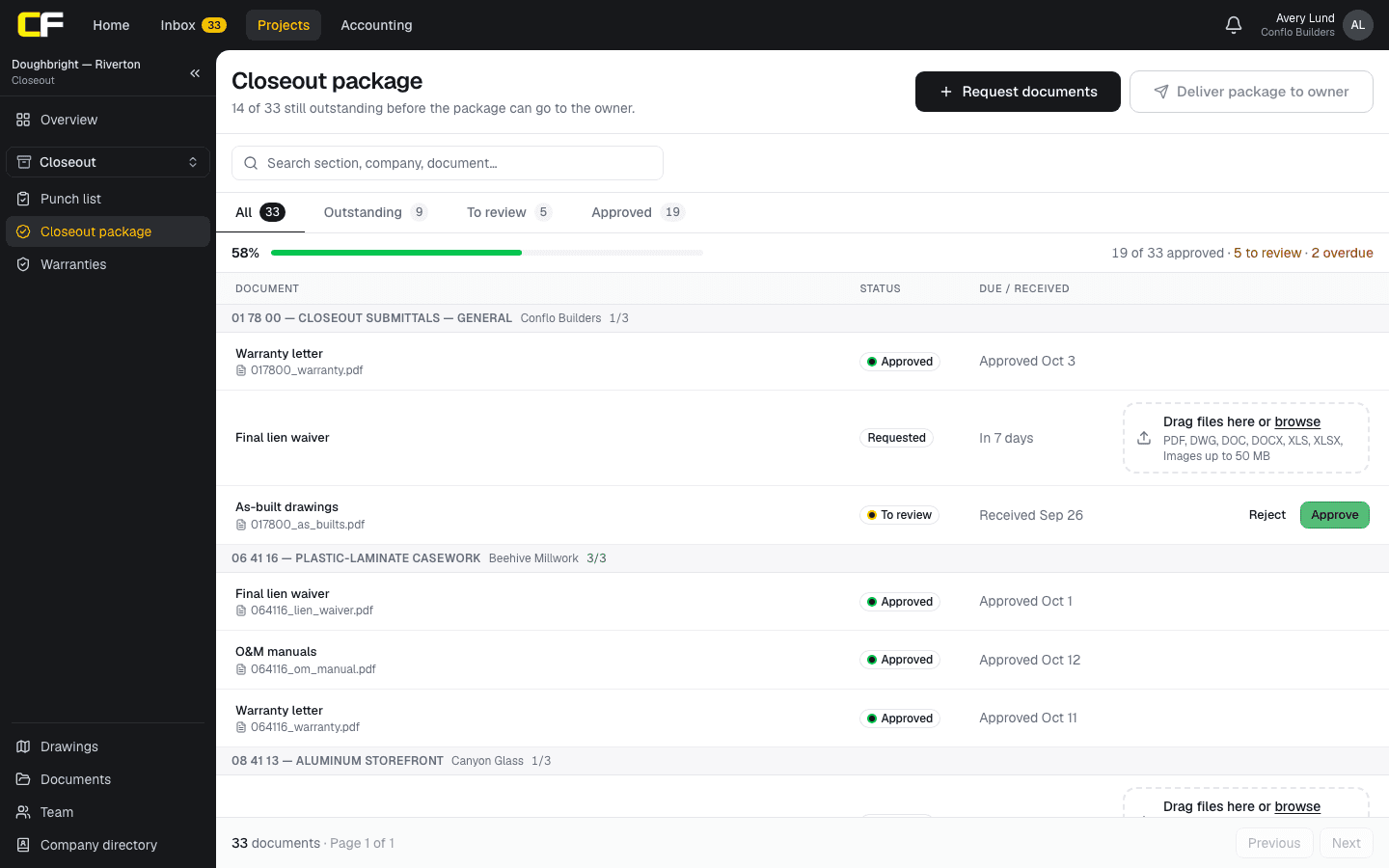
In Conflo's closeout package, the GC requests as-built drawings from your company by spec section, with a due date. You turn in the file on that request; the GC approves it, or sends it back with a note that stays visible to you until you resubmit. Overdue requests are flagged, so both sides see what is still owed.
The bottom line
Keep as-builts as you build: one set, one color code, every change marked the day it happens with its reason, and buried work dimensioned to fixed points.
Turn them in on the closeout log's date and your retainage isn't waiting on paperwork. More for your seat is in the subcontractor's guide and the project lifecycle.
Sources
- UFGS 01 78 00, Closeout Submittals (August 2026), §1.2.1, §1.2.2, §3.1, §3.1.1 and §3.1.2 — U.S. Army Corps of Engineers (Whole Building Design Guide). Read October 22, 2026.
- UFGS 01 32 01.00 10, Project Schedule (August 2026), §3.3.5 Mandatory Activities — U.S. Army Corps of Engineers (Whole Building Design Guide). Read October 22, 2026.
Questions
What is the difference between as-built and record drawings?
As-builts are the contract drawings marked up in the field by the contractor and subs to show what was built. Record drawings are the clean final set compiled from those markups, usually by the architect or the GC.
Who is responsible for as-built drawings?
The GC owes them to the owner under the prime contract, and each subcontractor marks up its own trade's sheets under its subcontract. The specification's closeout section says what is required and when.
What colors are used on as-built drawings?
A common code, used by federal guide specifications, is red for deletions, green for additions and blue for special notes and information. Add a legend if you use any other color.
How often should as-builts be updated?
As changes happen, and at least weekly. Federal specifications ask for the working set to be kept current weekly and available on site for review.
When are as-built drawings submitted?
When the specification says, often before substantial completion or with the closeout package. Federal guide specifications ask for them 30 days before beneficial occupancy.
Related
Closeout
How Do You Assemble a Construction Closeout Package?
A closeout checklist by spec section and company: O&M manuals, as-builts, warranties, attic stock, training, lien waivers. Build it at buyout. Example.
· 9 min read
Money
How Does a Subcontractor Get Retainage Released?
Finish your scope, close your punch items, send closeout documents and a written release request with the waiver asked for, and know your state's deadline.
· 6 min read
Construction
How Does an Architect Issue a Drawing Revision?
How an architect issues a revised drawing sheet: clouds around what changed, a delta with the revision number, the revision block and the issue.
· 7 min read
Role hub
The Subcontractor's Guide: Bidding to Getting Paid
Every step of a commercial job from the subcontractor's seat: bidding, the subcontract, submittals, RFIs, change orders, pay apps, retainage and closeout.
· 9 min read