
How Do You Set Up a Submittal Log From the Specs?
By Wyatt Cooper · Published · 10 min read
Key takeaways
- The specifications list what must be submitted: each technical section's Part 1 has a Submittals article, and Division 01 sets the procedure, the review time and the review codes.
- A submittal log has one row per required item, numbered in one sequence, with its spec section, type, who prepares it, who reviews it and whether it needs approval or is for information only.
- Work each date backward: approve-by is the required-on-site date minus the supplier's lead time, and submit-by is the approve-by date minus the review time.
- Under AIA A201–2017, a contractor that doesn't submit a submittal schedule, or doesn't follow it, can't claim more money or time for the time submittal review takes (§3.10.2).
To set up a submittal log, go through the specifications section by section and add one row for every item each section's Submittals article asks for: the spec section, a title, the type (shop drawings, product data, samples and so on), who prepares it and who reviews it. Then add the date each item is needed on site and its lead time, work back to an approve-by and a submit-by date, and sort by submit-by to get your submittal schedule.
What a submittal log is for
A submittal log (the federal specs call it a submittal register) is the list of every submittal the contract requires, with where each one stands. It does two jobs. Before work starts, it is the plan: what must be submitted, by whom and by when. During the job, it is the tracker: what has gone out, who has it now, and what came back approved.
It is also a contract duty on most jobs. Under the AIA's general conditions, A201–2017 §3.10.2, the contractor submits a submittal schedule for the architect's approval "promptly after being awarded the Contract", coordinated with the construction schedule and allowing the architect reasonable time to review. A contractor that doesn't, or that falls behind it, gives up any increase in price or time "based on the time required for review of submittals". The log is where that schedule comes from. Your contract may change these words, so read yours.
Where the specs tell you what to submit
Commercial specifications are organized by CSI MasterFormat: 50 divisions, each split into sections numbered with at least six digits, such as 08 11 13 (WBDG's MasterFormat summary). Two places in that book build your log.
- Division 01, usually section 01 33 00 Submittal Procedures, sets the rules: how to number and transmit submittals, how long review takes, what the review codes mean, and whether you must keep a register.
- Each technical section lists its own submittals near the start of Part 1 (General), in an article titled Submittals, grouped by type. Part 2 (Products) and Part 3 (Execution) sometimes ask for more, such as test reports or field samples, so skim them too.
The federal guide specification for steel doors, UFGS 08 11 13, shows the pattern. Its paragraph 1.2 Submittals lists shop drawings for doors, frames and accessories, product data for the same items, and samples of the factory finish. Items marked "G" (or "S", for sustainability proof) need government approval; the rest are reviewed by the contractor's quality control and are for information only. Your spec will use its own marks, but it will draw the same line between items that need approval and items that are just for the record.
| Type | What it is | Typical reviewer |
|---|---|---|
| Shop drawings | Drawings made for this job by the sub, fabricator or supplier showing how the work will be built | Architect or the engineer of that discipline |
| Product data | Manufacturer's cut sheets, catalog pages and performance data for a standard product | Architect or engineer |
| Samples | Physical pieces of the material or finish that set the standard the work is judged by | Architect, often for color and finish |
| Design data and calculations | Calculations, mix designs or delegated design, often stamped by the sub's engineer | Engineer of record |
| Test reports and certificates | Lab results and manufacturers' statements that the product meets the spec | Often information only |
| Closeout submittals | Warranties, O&M manuals, record drawings, attic stock | Architect, near the end of the job |
Set up the log, step by step
- Read Division 01 first. Note the review time, the review codes, the numbering rule and the form the architect wants submittals sent on.
- Go section by section through the technical divisions, in spec order. For each Submittals article, add one row per item. Write the spec section and paragraph so anyone can find the requirement.
- Give every row a number in one sequence for the whole job. Many teams also group rows by section so the log reads like the spec book.
- Fill in the type, the sub or supplier who prepares it, and who reviews it: the architect, a consultant, or the GC only for information items.
- Mark each row action (it needs approval before the work proceeds) or information (it is filed for the record).
- Add the schedule activity each item holds up and the date the material must be on site. Ask the sub or supplier for the lead time from approval to delivery.
- Work back to the approve-by date (on site minus lead time) and the submit-by date (approve-by minus the review time in Division 01). If the sub sends it to you first, also take off your own review days to get the sub's date. Sort by submit-by: that is your submittal schedule.
- Send each sub its rows and dates with the subcontract or at buyout, and send the schedule to the architect for approval.
Don't rely on a list someone else made. On federal jobs the government supplies an initial register, but UFGS 01 33 00 says it "may not be all-inclusive", and approval doesn't excuse a submittal the contract requires that was left off or marked "N/A". The same goes for a list exported from software or handed over by the architect. Check it against the book. If you want a ready layout, start from our free submittal log template.
A worked example: five rows and their dates
Here is the start of a log on a made-up job, the Mill Creek Clinic, where Division 01 allows 14 calendar days for review. Each date is worked back from when the material is needed on site.
| No. | Spec section | Item and type | Required on site | Lead time | Approve by | Submit by |
|---|---|---|---|---|---|---|
| 001 | 03 30 00 | Concrete mix designs (design data) | Nov 16, 2026 | 7 days | Nov 9, 2026 | Oct 26, 2026 |
| 002 | 22 13 19 | Floor drains and cleanouts (product data) | Dec 7, 2026 | 21 days | Nov 16, 2026 | Nov 2, 2026 |
| 003 | 26 24 16 | Panelboards (shop drawings) | Feb 15, 2027 | 70 days | Dec 7, 2026 | Nov 23, 2026 |
| 004 | 08 11 13 | Hollow metal doors and frames (shop drawings) | Mar 1, 2027 | 42 days | Jan 18, 2027 | Jan 4, 2027 |
| 005 | 08 11 13 | Door recycled-content certificate (information) | — | — | — | With 004 |
Submittal 003 — Panelboards, shop drawings
- Spec section
- 26 24 16, paragraph 1.3 Submittals
- Type
- Shop drawings (action: approval needed)
- Prepared by
- Corner Post Electric (fictional), electrical subcontractor
- Reviewer
- MEP engineer, through the architect
- Holds up
- Set electrical gear
- Required on site
- February 15, 2027
- Lead time
- 70 days from approval to delivery
- Approve by
- December 7, 2026 (February 15 minus 70 days)
- Submit by
- November 23, 2026 (December 7 minus 14 days of review)
- Status
- Not yet submitted; ball in court: subcontractor
Notice the lead times. The doors are needed on site only two weeks after the panelboards, but the panelboards have to be submitted six weeks earlier, by November 23, because their 70-day lead time eats the difference. A log sorted by required-on-site date hides that; one sorted by submit-by shows it. Track it on the procurement log once it is approved and ordered.
The columns to keep as the job runs
Once submittals start moving, the log becomes the tracker. The City of Los Angeles Bureau of Engineering's document control procedure tracks each record's number, description, date received, date returned, reviewer and remarks, and the federal register adds the contractor's and reviewer's action codes. A working log needs at least these:
| Column | Why it matters |
|---|---|
| Number and revision | A resubmittal keeps its number and takes the next revision, so the history reads in one place |
| Spec section and paragraph | Anyone can check the item against the requirement |
| Date sent and date returned | Shows how long each reviewer held it, which matters if a delay is disputed |
| Ball in court | Who has it now: the sub preparing it, the GC checking it, or the design team reviewing it |
| Review code | Approved, approved as noted, revise and resubmit, or rejected, in the words your specs use |
| Required on site and approve by | Flags the items that will hold up the work if review runs long |
Go through the open items at each owner-architect-contractor meeting, oldest first, and update the log the same day. When an answer you need is a question about the documents rather than a review of a product, that is an RFI, not a submittal.
How it works in Conflo
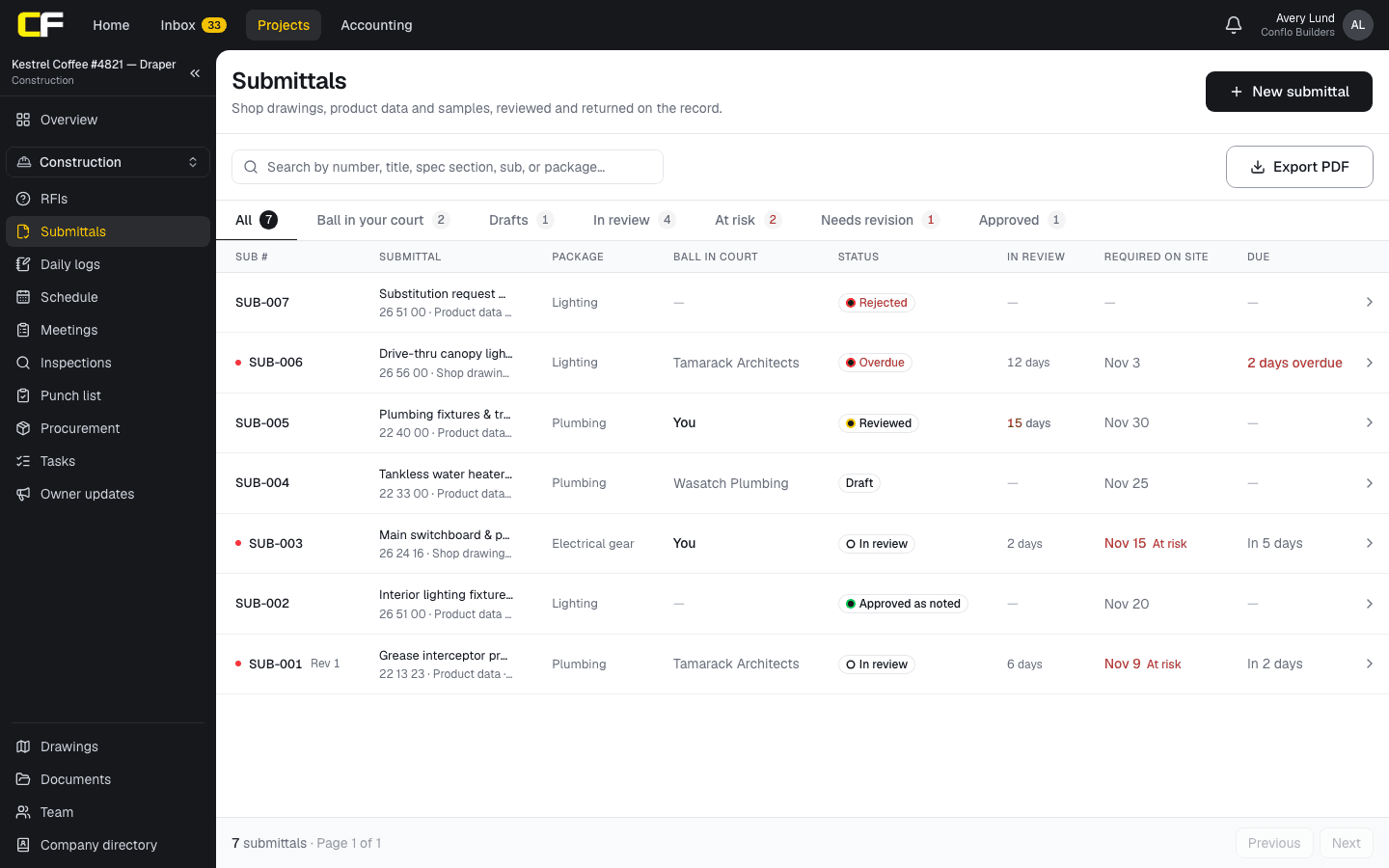
In Conflo's Submittals tool, each row of your log is a numbered submittal (SUB-001, SUB-002…) with its title, spec section, type, the sub who prepares it, a package, a location, the date it is needed on site and its lead time. Conflo works out the approve-by date (required on site minus lead time) and flags submittals at risk of missing it. It doesn't read your specifications: you add each item yourself, and it doesn't subtract the review time to give a submit-by date.
The log shows each submittal's spec section, package, whose court the ball is in, its status, days in review, the date it is required on site and when the current review is due, with tabs for what's waiting on you, in review, at risk, drafts, revise and resubmit, and approved. A resubmittal stays under the same number as Rev 1, Rev 2. You can export the log as a PDF for the meeting.
The bottom line
Build the log from the spec book, section by section, one row per required item. Give every action item a required-on-site date and a lead time, work back to submit-by, and send the schedule to the architect and each sub their rows.
Then keep it current: date sent, date returned, ball in court and review code, reviewed at every meeting.
Sources
- Summary: A201–2017, General Conditions of the Contract for Construction — AIA Contract Documents. Read October 17, 2026.
- UFGS 01 33 00 Submittal Procedures (August 2026) — Whole Building Design Guide, USACE / NAVFAC / AFCEC. Read October 16, 2026.
- UFGS 08 11 13 Steel Doors and Frames — Whole Building Design Guide, USACE / NAVFAC / AFCEC. Read October 16, 2026.
- CSI MasterFormat — Whole Building Design Guide (SpecsIntact help). Read October 16, 2026.
- Project Delivery Manual, 16.5 Construction Document Control — City of Los Angeles, Bureau of Engineering. Read October 16, 2026.
Questions
How do you create a submittal log from the specifications?
Go through the spec book section by section. In each technical section, find the Submittals article in Part 1 and add one row per item it asks for, with the spec section, a title, the type, who prepares it and who reviews it. Then add dates and sort by when each must be submitted.
What is the difference between a submittal log and a submittal schedule?
The log lists every required submittal and tracks where each one stands. The schedule is the same list with planned dates: when each item must be submitted and approved to arrive on site in time. Most teams keep both in one sheet, sorted by submit-by date.
Who prepares the submittal log, the GC or the subcontractor?
The general contractor, on most jobs. The contract usually makes the contractor responsible for the submittal schedule, and each sub prepares the submittals for its own scope. On federal jobs the government may supply an initial register that the contractor completes and keeps current.
How much review time should a submittal log allow?
Whatever your Division 01 specifications say, often stated in calendar or working days per review. The federal guide specification's default is 30 calendar days, with more for complex items. Count each resubmittal as a full new review period, because most specs do.
Should information-only submittals go on the log?
Yes. Certificates, test reports and other information items are still required by the contract, and closeout often depends on them. Mark them as information so nobody waits for an approval that isn't coming.
Related
Template
Free Submittal Log Template (Excel)
A free submittal log template in Excel, no email needed: one row per spec item, with approve-by and submit-by dates worked out from lead times.
· 4 min read
Definition
What Is a Submittal in Construction?
A submittal is what the contractor sends the design team to show how it will meet the specs: shop drawings, product data, samples. Types and an example.
· 4 min read
Construction
How Does a Subcontractor Prepare a Submittal?
How a subcontractor prepares a submittal the GC and architect can approve the first time: what to include, how to mark it up, deviations, and resubmittals.
· 9 min read
Construction
How to Write an RFI in Construction (With an Example)
How to write an RFI in construction: the parts of a good request for information, a filled-in example, common mistakes, and how the RFI log works.
· 9 min read
Role hub
The General Contractor's Guide: Bid to Closeout
What a general contractor is responsible for at every phase of a commercial job, from bidding and buyout to RFIs, change orders, pay apps and closeout.
· 8 min read