
Free Bid Leveling Spreadsheet (Excel Template)
By Wyatt Cooper · Published · 4 min read
Key takeaways
- The spreadsheet levels up to five bids for one trade package: base bids, a plug or deduct per scope item, leveled totals, each bid against the low and the median, and alternates kept out of the total.
- It comes with a filled-in example sheet, the fictional drywall package from our leveling guide, so you can see every formula working before you use it.
- It is a plain Excel file with no macros, free, with no email address asked.
This free bid leveling spreadsheet is an Excel workbook for comparing subcontractor bids for one trade. Enter each bidder's base bid, then for each scope item add a plug for work the bidder excluded or a deduct for extra work. The sheet adds each leveled total, shows how far each bid is above the lowest and from the median, and keeps alternates on their own rows. A filled-in example sheet is included.
Download the bid leveling spreadsheet (.xlsx)
Download (XLSX, no email needed)What is in the workbook
- How to use: the steps below, in the file.
- Leveling: the blank sheet. Project, package and bid due date; five bidder columns; base bids; fifteen scope rows with a column for where each plug came from; leveled totals; each bid above the lowest and against the median; a check-before-award block (addenda acknowledged, bond, exclusions and qualifications, schedule); four alternate rows and the total with Alternate 1.
- Example: the same sheet filled in with three fictional drywall bids.
How to fill it in
- Write the scope items in column A from the drawings, specifications and your bid package, before you open the first proposal. See how to write a scope of work for a subcontractor.
- Enter each bidder's name and base bid.
- For each scope item and bidder: leave it blank if the bid includes the item; enter a positive plug if the bidder excluded it; enter a negative deduct if the bidder included work that is not in this package.
- Use the same plug for every bidder who excluded the same item, and note its source in column B.
- Read the leveled totals, then the differences from the lowest and from the median. A bid far from the median deserves a call before anything else.
- Price alternates in their own rows; they never change the leveled total.
- Before award, ask the apparent low bidder to price your plugs in writing, and replace each plug with its price.
The example sheet
The Example sheet holds the three fictional drywall bids from how to level subcontractor bids. Base bids of $412,000, $398,500 and $431,750 level to $427,300, $411,700 and $425,750. The median leveled total is $425,750, so the low bid is 3.3% below it ($14,050 ÷ $425,750) and the highest leveled bid is 0.4% above it ($1,550 ÷ $425,750). With Alternate 1 the totals are $441,800, $427,900 and $438,650.
Keep the tab of bids as received as well: public owners keep that record (FAR 14.403), and it is the difference between what was offered and what you adjusted. The difference between a bid tabulation and bid leveling is that record versus the adjusted comparison. The Federal Highway Administration's bid review guidelines also look at the range of bids and prices that differ significantly from the estimate and the other bids, which is what the median row is for.
How it works in Conflo
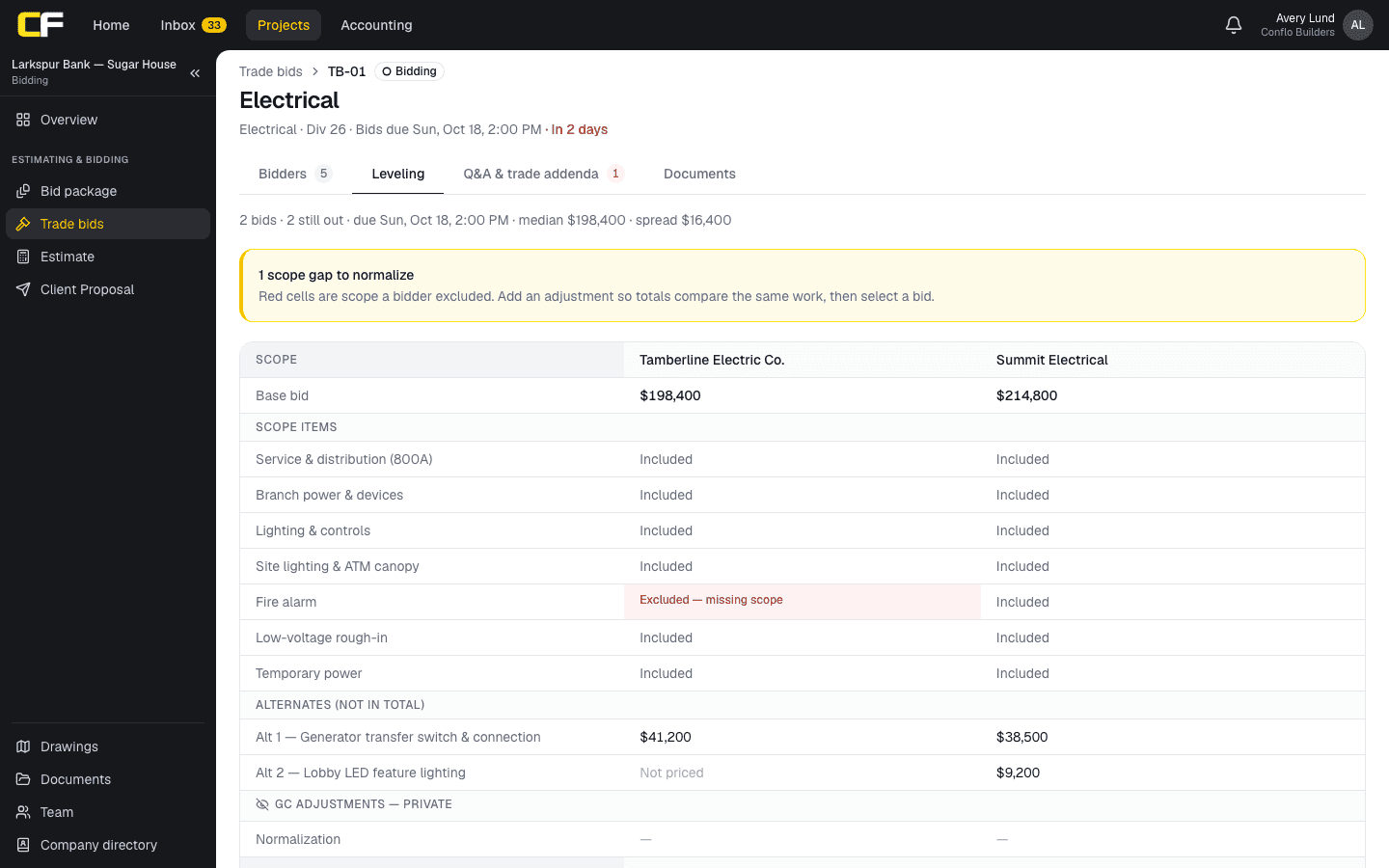
In Conflo, the leveling sheet builds itself from the bids: each trade bid's Leveling tab puts every submitted bid in a column against the package's scope items, flags excluded items, takes your private adjustments, highlights the lowest leveled total and, with three or more bids, flags any bid more than 15% from the median. Selecting and awarding happen on the same page. See bid leveling.
The bottom line
Download the spreadsheet, list your scope items first, and plug every gap the same way for every bidder. The arithmetic is in the formulas; the judgment is in the plugs.
When you level every package on every job, Conflo does the same thing with the bids your subs submit online.
Sources
- FAR 14.403, Recording of bids — Acquisition.gov, U.S. General Services Administration. Read October 16, 2026.
- Guidelines on Preparing Engineer's Estimate, Bid Reviews and Evaluation (October 7, 2021), Bid Review Factors — Federal Highway Administration. Read October 17, 2026.
Questions
Is the bid leveling spreadsheet free?
Yes. It is a free Excel file with no macros, and the download asks for no email address. Change it however you need.
Does it work in Google Sheets or Numbers?
It is a standard .xlsx file whose formulas use only SUM, MIN, MEDIAN and IF, functions Google Sheets and Apple Numbers also have, so it should work there too; check the totals against the Example sheet after you open it.
How many bidders and scope items does it hold?
Five bidders and fifteen scope items on the blank sheet, plus four alternates. To add items, insert rows between the first and last scope rows, and the totals pick them up.
Should alternates be in the leveled total?
No. They sit on their own rows so the base comparison stays clean; the sheet shows the total with Alternate 1 separately.
Related
Bidding
How Do You Level Subcontractor Bids?
Level subcontractor bids by pricing every scope gap, exclusion and missing addendum so each bid covers the same work, then compare the leveled totals.
· 9 min read
Definition
What Is a Plug Number in a Bid?
A plug number is an estimator's own figure for work with no firm price yet: a placeholder in the estimate, or an add to a bid that excluded scope.
· 4 min read
Definition
Bid Tabulation vs Bid Leveling: What's the Difference?
A bid tabulation records each bid as received; bid leveling adjusts each bid for scope gaps so all cover the same work. How they differ, with an example.
· 4 min read
Role hub
The General Contractor's Guide: Bid to Closeout
What a general contractor is responsible for at every phase of a commercial job, from bidding and buyout to RFIs, change orders, pay apps and closeout.
· 8 min read