
Conflo vs Microsoft Project for Construction Schedules
By Wyatt Cooper · Published · 6 min read · Last checked
Key takeaways
- Both build critical-path schedules with linked tasks, lag, baselines and working-day calendars.
- Conflo's schedule is shared with the job: subs update progress on their own tasks, owners and architects read it, and a two-week lookahead groups the work by company.
- Microsoft Project goes deeper in pure scheduling: resource leveling, free slack, multiple critical paths, master projects and a network diagram, none of which Conflo has.
- They exchange files: Conflo imports a Microsoft Project XML export and downloads its schedule as Microsoft Project XML.
Conflo and Microsoft Project both build critical-path schedules with linked tasks, lag, baselines and working-day calendars. Conflo's schedule lives on the project with the RFIs, submittals and daily logs: subcontractors update their own progress, owners read the key dates, and a two-week lookahead groups work by company. Microsoft Project is the deeper scheduling tool, with resource leveling, free slack, multiple critical paths and master projects. Conflo imports Project XML and exports back to it.
Where Conflo is different
- The schedule is part of the job, not a file. Microsoft describes many Project users building schedules in the desktop client and sharing them as .mpp files (Microsoft Support). In Conflo the GC edits the schedule and everyone invited to the project reads the same one.
- Subcontractors update their own work. A sub sees its company's tasks marked as its own and sets their progress; it can't change anyone else's dates or links.
- A lookahead by company. The 2-week lookahead shows the next 14 days grouped by the company responsible, with critical tasks marked, for the weekly subcontractor meeting.
- Buffers by audience. The GC can add buffer days to what subcontractors and the owner see on a task, while working to the real dates.
- One platform. RFIs, submittals, daily logs, inspections, change orders and pay applications sit on the same project, and every tool is on every plan.
- A published price. Conflo is priced per active project with unlimited users, and subcontractors, owners and architects are always free (pricing).
Side by side
| Conflo | Microsoft Project (desktop) | |
|---|---|---|
| Critical path | Calculated from the links; tasks with zero total float are marked critical | Calculated; shown as red Gantt bars, with an option to treat tasks with some slack as critical |
| Multiple critical paths | No: one | Yes, an option in the calculation settings |
| Float | Total float, in working days | Total slack and free slack |
| Links | Finish-to-start, start-to-start, finish-to-finish, start-to-finish, with lead or lag | Dependencies with lead and lag |
| Calendars | One work calendar per project: work week and holidays | Project, task and resource calendars |
| Baselines | Yes, with each task's variance in days | Yes, up to 11 per project |
| Saved versions | Named snapshots of the whole schedule that can be restored | Up to 10 interim plans (start and finish dates only), or a copy of the .mpp file |
| Constraints | Kept on tasks and carried through imports and exports | Yes |
| Resource loading and leveling | No | Yes: Level All, Level Resource, Level Selection |
| Cost loading | No | Cost resources |
| Master projects, network diagram | No | Yes |
| Lookahead | Built in: 14 days, grouped by company | Not a separate view among the features Microsoft lists |
| Who updates progress | The GC, and each sub on its own company's tasks | In the desktop client, whoever keeps the shared .mpp file updated |
| Files in | Microsoft Project XML, Primavera P6 XML, Excel and CSV | Its own .mpp and .mpt files and XML |
| Files out | Microsoft Project XML | Its own .mpp files, XML and PDF; field data from one table to Excel, CSV or text |
| Price | Published on /pricing: Free for one active project, Team $599 a month for up to five, Business $1,499 a month for up to 15 | Published by Microsoft on its own site (see below) |
Microsoft's side of the table is from its own support pages: critical path, free slack, resource leveling, how Project schedules tasks (project, task and resource calendars, constraints and cost resources), baselines and interim plans, file formats and the feature comparison that lists deadlines, master projects, the network diagram, Team Planner, task inspector and task path, and describes many users sharing .mpp files and keeping them updated. Microsoft publishes Project's plans and prices on its own website; check them there.
Two dates matter if you use Microsoft's online products. Microsoft's lifecycle page puts Project Online's retirement on September 30, 2026, and its support pages say Project for the web is becoming Microsoft Planner.
Moving a schedule between them
Conflo doesn't open .mpp files directly. Conflo's import asks for the XML file Microsoft Project saves (File, Save As, XML Format); summary tasks, tasks, milestones, links, lag, constraints, progress and actual dates come across. Baselines don't: save a new baseline in Conflo after the import. Going the other way, Conflo's "Download for MS Project" button writes a Microsoft Project XML file with the same tasks, links and holidays. Each task carries its Conflo id in a text field, so a later import of the same file updates tasks instead of duplicating them.
Primavera P6 schedules come in as P6 XML exports; Conflo doesn't read P6's .xer format, and it doesn't write P6 files.
Choose Microsoft Project if…
- You load and level resources: crews, equipment and their availability, with Project delaying or splitting tasks to clear overallocations.
- You need free slack, multiple critical paths, a network diagram or master projects across several schedules.
- Your schedule needs more than one calendar, for example a 7-day calendar for cure times or a weather calendar, as federal guide specifications such as UFGS 01 32 01.00 10 describe. Conflo has one calendar per project.
- Your owner wants a native .mpp file each month, or your scheduler works offline in a desktop file.
- You only need a scheduling tool, not RFIs, submittals, logs and pay applications in the same place.
And if your contract requires Primavera P6 (many federal and DOT jobs do), you need P6: neither Conflo nor Microsoft Project replaces it.
Choose Conflo if…
- You want subs to update their own progress and owners to read the same schedule, without emailing files.
- Your weekly meeting runs off a lookahead by company, and you are tired of rebuilding it in a spreadsheet.
- You want the schedule on the same project as the critical path work's RFIs, submittals and daily logs.
- You want a price you can read before you call anyone, with unlimited users.
How it works in Conflo
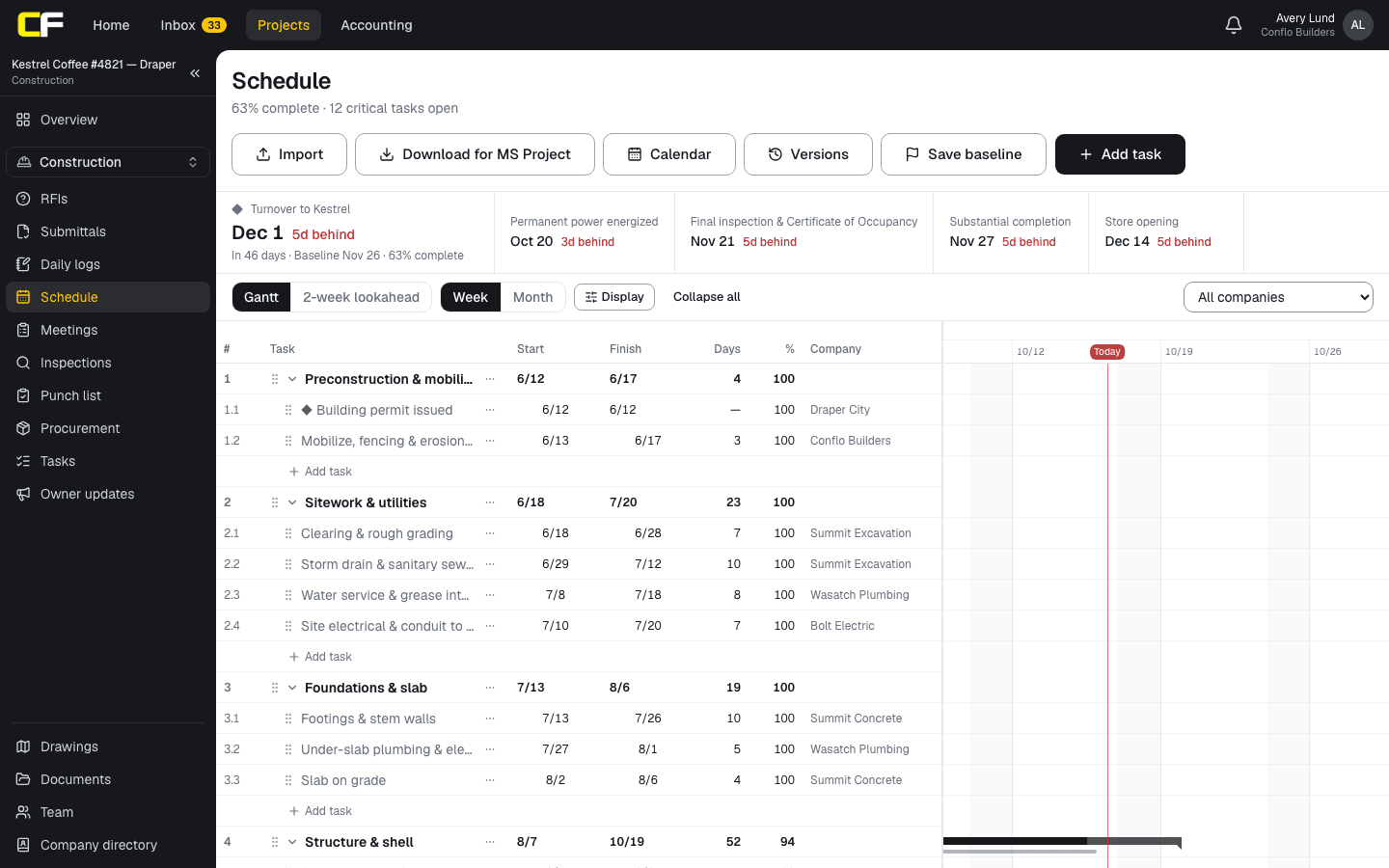
The schedule header carries Import, Download for MS Project, Calendar, Versions and Save baseline. Key dates sit above the Gantt with how far each is behind its baseline, and the 2-week lookahead is one tab away.
The bottom line
Microsoft Project is the stronger pure scheduling engine, especially for resources. Conflo's schedule is the one the whole job shares: subs update their own work, owners read it, and it sits next to everything else on the project.
If you schedule in Project today, you can import your XML into Conflo and download it back. Join the waitlist to try it on a job.
Sources
- Show the critical path of your project in Project — Microsoft Support. Read October 16, 2026.
- Free Slack (task field) — Microsoft Support. Read October 16, 2026.
- Distribute project work evenly (level resource assignments) — Microsoft Support. Read October 16, 2026.
- Project for the web and Microsoft Project desktop client — Microsoft Support. Read October 16, 2026.
- How Project schedules tasks: Behind the scenes — Microsoft Support. Read October 16, 2026.
- Create or update a baseline or an interim plan in Project desktop — Microsoft Support. Read October 17, 2026.
- File formats supported by Microsoft Project desktop client — Microsoft Support. Read October 17, 2026.
- Project Online lifecycle — Microsoft Learn. Read October 16, 2026.
- UFGS 01 32 01.00 10, Project Schedule (August 2026), §3.3.10 Calendars — U.S. Army Corps of Engineers (Whole Building Design Guide). Read October 16, 2026.
Questions
Is Microsoft Project good for construction scheduling?
Yes, it is a full critical-path scheduler with baselines, slack, resource leveling and master projects. What it doesn't do is the rest of the job: RFIs, submittals, daily logs, and subs updating their own progress on a shared schedule.
Can Conflo open a Microsoft Project file?
It imports the XML file Microsoft Project saves (File, Save As, XML Format), not the .mpp file itself. Tasks, milestones, links, lag, constraints, progress and actual dates come across; set the baseline again in Conflo.
Can I send my Conflo schedule to someone who uses Microsoft Project?
Yes. Download for MS Project writes a Microsoft Project XML file that opens in Project with the same tasks, links and holidays. Only the GC's team can download it, and it carries the real dates, not any buffered ones.
Does Conflo do resource leveling?
No. Conflo records the company and person responsible for each task, but it doesn't load crews or equipment onto tasks or level them. Use Microsoft Project or P6 if you need that.
Related
Definition
What Is the Critical Path in Construction?
The critical path is the longest chain of linked activities in a construction schedule. A worked five-activity example, float, and what a delay does.
· 4 min read
Definition
What Is Float in a Construction Schedule?
Float is how many working days an activity can slip. Total float vs free float, worked on a five-activity network, and who owns the float.
· 4 min read
Construction
How Do You Build a Three-Week Look-Ahead Schedule?
How to build a three-week look-ahead from the master schedule: crew-sized pieces of work, what must be ready, and how to run it at the weekly meeting.
· 7 min read
Comparison
Conflo vs Procore for Small and Mid-Size GCs
Conflo vs Procore for small and mid-size general contractors: how each is priced, what each covers, where Procore is stronger, and who should choose which.
· 7 min read
Preconstruction
How Do You Build a Construction Schedule?
Build a commercial construction schedule step by step: activities from the estimate, durations from crew rates, logic, procurement and the critical path.
· 8 min read
Role hub
The General Contractor's Guide: Bid to Closeout
What a general contractor is responsible for at every phase of a commercial job, from bidding and buyout to RFIs, change orders, pay apps and closeout.
· 8 min read