
Conflo vs Procore for Small and Mid-Size GCs
By Wyatt Cooper · Published · 7 min read · Last checked
Key takeaways
- Conflo publishes its prices: free for one active project, $599 a month for up to five, $1,499 a month for up to fifteen. Procore publishes no price and quotes an annual fee based on construction volume.
- Both include unlimited users. Conflo charges only the general contractor, by active project, so jobs you are bidding never count toward the bill.
- Conflo puts bidding, project management, money and closeout tools on every plan; Procore sells products separately and you choose which to buy.
- Procore is the stronger pick if you need integrations, payments, a long track record or enterprise support today. Conflo is new and still opening to companies from a waitlist.
For a small or mid-size GC, the biggest difference is how you pay. Conflo publishes flat prices by active project, with unlimited users and free access for subs, owners and architects. Procore quotes an annual fee by product, based on your annual construction volume, and publishes no price. Procore is far more established, with hundreds of integrations and a payments product; Conflo is new, covers bid to closeout in one plan, and is opening from a waitlist.
Conflo and Procore at a glance
Both are construction management platforms for commercial work, used by the GC and shared with subs, owners and the design team. This page compares what each publishes about itself, checked on the date shown above. Procore's figures come from its own pages; Conflo's from its pricing page and the app as it is today.
| Conflo | Procore | |
|---|---|---|
| Published price | Yes: $0, $599 or $1,499 a month, or Enterprise by quote | No: a custom quote |
| What the price is based on | Active projects where you are the GC | Products bought and annual construction volume (ACV) |
| Users | Unlimited on every plan | Unlimited |
| Who pays | Only the general contractor; subs, owners and architects are free | The account holder; Procore suggests subs get their own account for more features |
| What is included | Every tool on every plan, the free one too | You choose products (for example Project Management, Project Financials, Bid Management) |
| Free plan | One active project | None listed |
| Integrations | None live yet | 500+ integrations and apps (Procore's figure) |
| Payments to subs | Tracked, not processed: Conflo records payments | Procore Pay, a subcontractor payment product |
| Status | New; opening to companies from a waitlist | Established; 17,850+ companies (Procore's figure) |
Pricing: published per project vs quoted by volume
Procore's pricing page says it charges "an upfront annual fee by product" based on your annual construction volume, "the aggregate dollar value of the construction work across your projects." It includes unlimited users, unlimited data and unlimited 24/7 support, and it gives no dollar figure: you ask for a quote.
Conflo's prices are on its pricing page. Free covers one active project. Team is $599 a month for up to five active projects, and each extra project is $179 a month. Business is $1,499 a month for up to fifteen. Paid yearly, Team is $5,990 and Business $14,990, two months free. Enterprise, for unlimited projects, is by conversation.
An active project is a job where you are the GC, from award to closeout. Jobs you are bidding, jobs you lost or passed on, and completed jobs don't count. So a GC bidding twenty jobs and building four pays the Team price, and the bill does not grow when one job's contract value does.
A GC building 7 jobs at once, bidding 15 more
- Active projects
- 7 (bidding jobs don't count)
- Team, monthly
- $599 for the first 5 + 2 × $179 = $957 a month
- Team, yearly
- $5,990 + 2 × $1,790 = $9,570 a year
- Business, monthly
- $1,499 a month, up to 15 active projects
- Which is cheaper
- Team, until extra projects push it past $1,499 a month (at 10 active projects Team is $599 + 5 × $179 = $1,494)
- Users
- Unlimited on either plan; subs, owner and architect free
What each covers
Procore's small business page lists Project Management, Project Financials, Quality & Safety, Invoice Management, Resource Tracking and Bid Management, and promises onboarding in "30 days or less". Its bid management page covers creating, leveling and tracking bid invitations, prequalifying partners and converting bids to contracts that update the budget.
Conflo's tools, all on every plan: trade bids with scope items, bidder questions and addenda; bid leveling; estimate, client proposal and buyout; RFIs, submittals, daily logs, schedule, meetings, inspections and punch list; budget, commitments, change orders and pay apps with retainage and lien waivers; and the closeout package and warranties.
Setup is self-serve. You set up the company yourself, import contacts from a spreadsheet or CSV, and start with your next job; Conflo charges nothing for onboarding. Jobs already under way stay where they are.
Where Procore is stronger
- Track record and scale: Procore says it is trusted by "17,850+ companies" (general contractors page). Conflo is new.
- Integrations: Procore lists "500+ integrations and apps" (Procore vs Autodesk). Conflo has no live integrations today; approved sub pay apps export to your bookkeeper as a file.
- Payments: Procore offers Procore Pay for paying subcontractors. Conflo tracks a pay app from submission to paid and records payments, but it does not move money.
- Support: Procore includes unlimited 24/7 support on its pricing page. Conflo lists priority support on Business and dedicated onboarding and support on Enterprise.
- Breadth: Procore sells products Conflo doesn't have, such as Resource Tracking.
- Availability: you can buy Procore today. Conflo is opening to new companies from a waitlist.
Choose Procore if…
- You need your project system connected to accounting, ERP or other tools now.
- You want to pay subs through the same platform.
- You run large or many concurrent jobs and want a vendor with enterprise support and a long record.
- Your owners or partners already require Procore on their projects.
Choose Conflo if…
- You want to know the price before you talk to sales, and want it based on jobs, not construction volume.
- You bid many jobs and build a few, and don't want bidding work to count toward the bill.
- You want every tool from bid to closeout in one plan, with subs, owners and architects free.
- You are starting fresh jobs and can wait for the waitlist to open, and you don't need integrations on day one.
Weighing Procore's cost first? See how much Procore costs, or the wider list of Procore alternatives.
How it works in Conflo
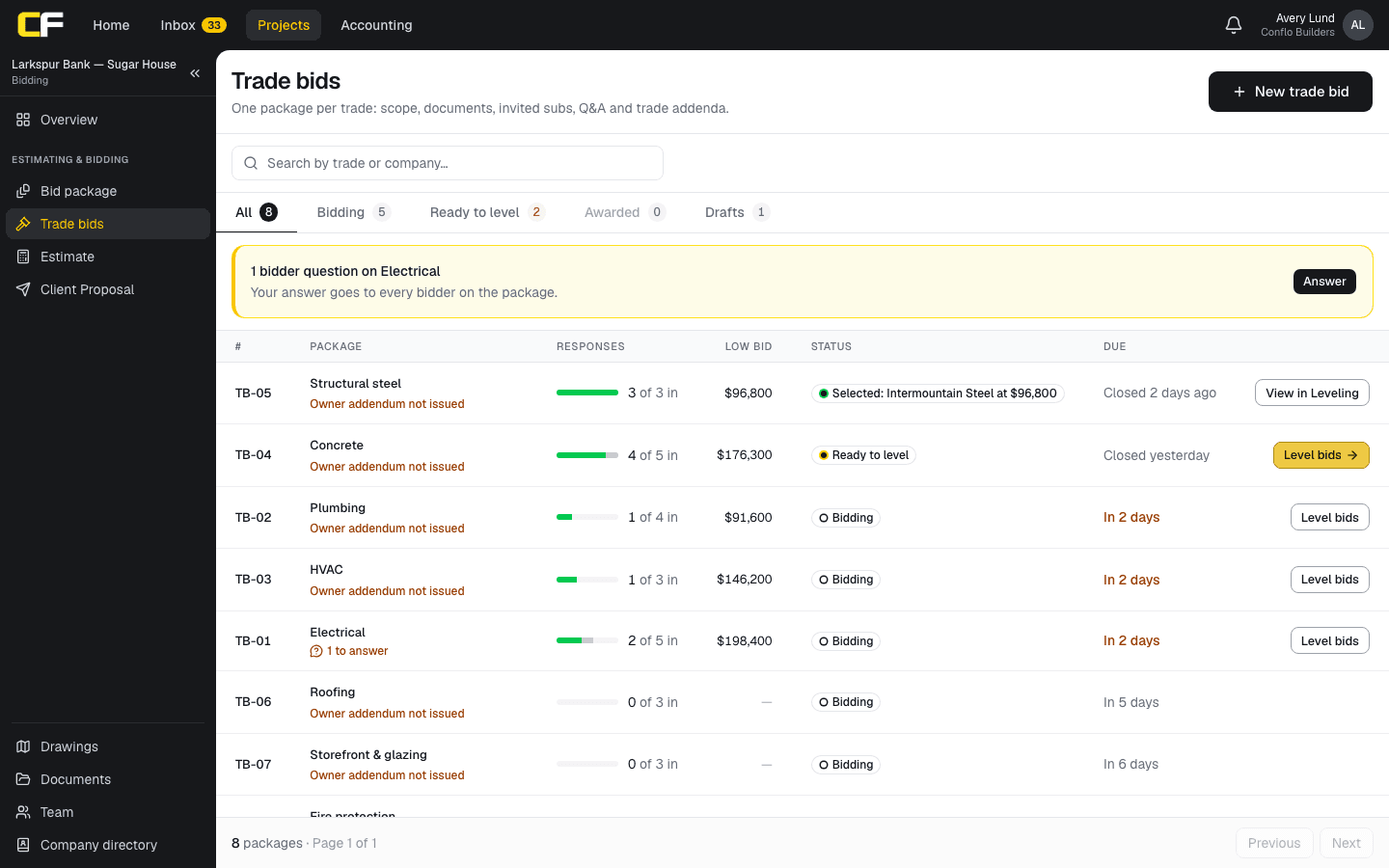
On a bidding job, Trade bids holds one package per trade with how many bidders responded, the low bid, its status and the due date. Subs bid free from their own login, and the Leveling tab puts their bids side by side by scope item.
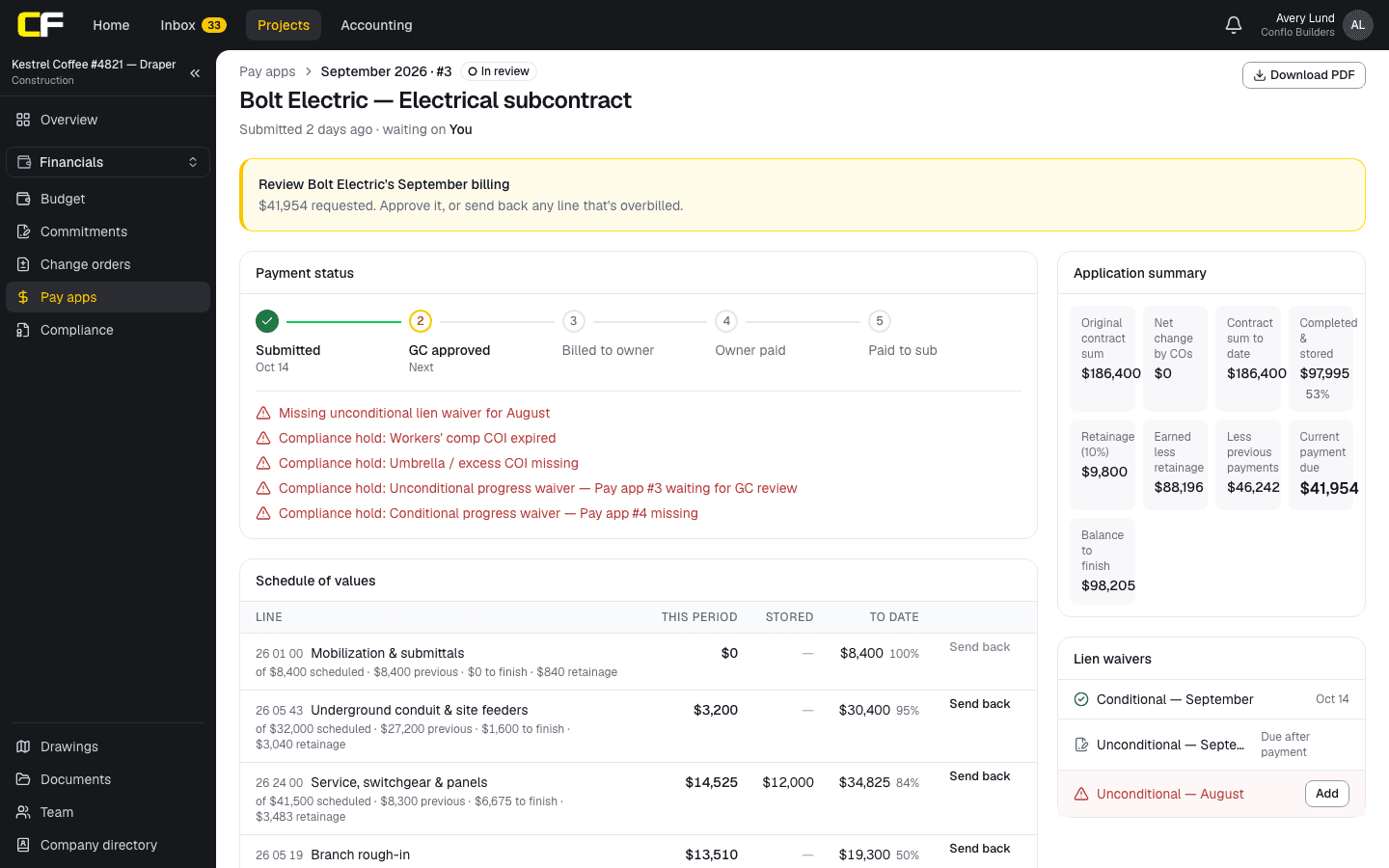
Once the job is built, the same subs bill in Pay apps: the GC reviews each line, retainage is calculated, and payment waits on the lien waivers. It is the same project and the same login from bid to closeout.
The bottom line
Procore is the established choice, with integrations, payments and enterprise support that Conflo does not have yet. Conflo's case is a published, per-project price, every tool on every plan, and subs, owners and architects free.
If that is the trade you want, book a walkthrough, or join the Conflo waitlist.
Sources
- Procore pricing — Procore Technologies. Read October 16, 2026.
- Construction software for small businesses — Procore Technologies. Read October 16, 2026.
- Construction management software for general contractors — Procore Technologies. Read October 16, 2026.
- Procore vs Autodesk — Procore Technologies. Read October 16, 2026.
- Bid management — Procore Technologies. Read October 16, 2026.
- Construction software for specialty contractors — Procore Technologies. Read October 16, 2026.
- Construction payment software — Procore Technologies. Read October 17, 2026.
Questions
Is Conflo cheaper than Procore?
Procore publishes no price, so no one can say from its pages. Conflo's prices are published: free for one active project, $599 a month for up to five and $1,499 a month for up to fifteen. Get a Procore quote for your construction volume and compare it with those figures.
Does Procore charge per user?
No. Procore's pricing page says it includes unlimited users and prices by product and annual construction volume. Conflo also includes unlimited users, and prices by active project instead.
Do subcontractors pay to use Conflo?
No. Only the general contractor pays. Subcontractors, suppliers, owners and architects work on a GC's projects free, and a sub keeps one free login across every GC they work with.
Can I move a job that is already under way from Procore to Conflo?
Conflo is set up for new jobs: you start with your next one, and jobs already under way stay where they are. You can import your contacts from a spreadsheet or CSV.
Does Conflo integrate with accounting software?
Not live yet. Conflo has no live integrations today; approved sub pay apps go to your bookkeeper as a CSV or Excel file, one per batch. If your workflow depends on a live connection to accounting, Procore, with more than 500 integrations and apps by its own count, is the better fit for now.
Related
Pricing explainer
How Much Does Procore Cost?
How Procore pricing works: an annual fee per product set by your construction volume, with unlimited users, and what to ask for in a quote.
· 5 min read
Alternatives
Procore Alternatives for Small and Mid-Size GCs
Procore alternatives for small and mid-size general contractors, compared on published price, pricing model and commercial tools, with who each one suits.
· 6 min read
Comparison
Conflo vs Buildertrend for Commercial Contractors
Conflo vs Buildertrend for commercial GCs: submittals, pay apps and retainage, bidding and pricing, and why Buildertrend is the pick for residential.
· 6 min read
Bidding
How Do You Level Subcontractor Bids?
Level subcontractor bids by pricing every scope gap, exclusion and missing addendum so each bid covers the same work, then compare the leveled totals.
· 9 min read
Role hub
The General Contractor's Guide: Bid to Closeout
What a general contractor is responsible for at every phase of a commercial job, from bidding and buyout to RFIs, change orders, pay apps and closeout.
· 8 min read