
Conflo vs BuildingConnected for Bidding
By Wyatt Cooper · Published · 7 min read · Last checked
Key takeaways
- Conflo publishes its prices and only the general contractor pays; BuildingConnected's pricing page lists all three of its products as Request a Quote.
- BuildingConnected's biggest strength is its network: Autodesk says GCs can reach 1.5 million or more construction professionals, and Conflo has no network of new bidders to search.
- In Conflo the bid becomes the job: the awarded number carries into buyout, the subcontract and the sub's pay apps on the same project.
- BuildingConnected has subcontractor qualification (TradeTapp), a free Bid Board for subs and a paid Bid Board Pro; Conflo tracks compliance documents but has no prequalification questionnaire.
BuildingConnected is Autodesk's bid-management network: its strength is reaching new bidders, with qualification through TradeTapp, a free Bid Board for subs and paid products priced by quote. Conflo sends trade bids to the subs already in your directory, levels them by scope item, and carries the award into buyout, the subcontract and pay apps on the same job. Conflo's prices are published, bidding jobs never count against the plan, and subs join free. Choose by whether you need new bidders or one system after award.
The short answer: network versus one job record
Both tools let a general contractor send a trade bid, track who is bidding and compare the numbers. They differ in what surrounds that step. BuildingConnected is built around a large network of builders and the tools to find, invite and qualify them. Conflo is built around the job: the bid package, the leveling grid, the award, the subcontract and then the RFIs, submittals, change orders and pay apps of the same project.
This page compares the bidding step and what touches it. Every statement about BuildingConnected comes from Autodesk's own public pages, opened on the last-checked date above; every statement about Conflo is what the product does today.
Side by side: bidding in Conflo and BuildingConnected
| Conflo | BuildingConnected | |
|---|---|---|
| Who pays | Only the general contractor. Subcontractors, suppliers, owners and architects are free. | Three paid products on the pricing page: BuildingConnected Pro for GCs, Bid Board Pro for subs, TradeTapp for qualification. Subs can bid on the free Bid Board. |
| Published price | Free for 1 active project; Team $599 a month (5 active projects); Business $1,499 a month (15); Enterprise by quote. Bidding jobs never count. | Not published: each product says Request a Quote. Autodesk mentions user, project and account-based pricing and a 30-day money-back guarantee. |
| Finding new bidders | No network to search. Invite subs from your own directory, or add a company and email its contact. | The Builders Network: Autodesk says over 1,000,000 professionals on its product page and 1.5 million or more on its pricing page. |
| Bid package | One package per trade with a written scope, scope items, alternates and a due date and time; questions answered to all; numbered addenda. | Pro lists unlimited bid invites and projects and custom bid forms. |
| Leveling | A grid by scope item, excluded scope flagged, private adjustments, the median and any bid more than 15% from it flagged once three bids are in. | Pro lists bid leveling and cost comparison, and historical bid data and analytics. |
| Qualifying subs | Compliance documents (insurance certificates, W-9, license, lien waivers) with payment holds. No prequalification questionnaire or financial review. | TradeTapp: custom questionnaires, automated risk assessment, project-specific approvals and financial calculations. |
| After award | Buyout against the estimate, the subcontract issued and signed in Conflo, then the sub bills against it on the same project. | Autodesk says the Autodesk Build cost-management integration turns winning bids into contracts. |
| The sub's side | Free. One Bids board shows every invitation from every GC on Conflo, with win rate. | A free Bid Board to accept and submit bids; Bid Board Pro, priced by quote, adds bid forwarding from any source, calendar sync, company-wide views and bid analytics. |
Conflo's figures are as /pricing publishes them on the last-checked date; annual Team and Business plans are $5,990 and $14,990 a year. BuildingConnected's are from its product page and pricing page.
Where Conflo is the better fit
- You want to know the price before a sales call. Conflo's plans are on its pricing page, priced by active project, with unlimited users on every plan.
- You bid a lot and win a fraction. A job in bidding never counts against a Conflo plan, on any plan including Free, and neither does a lost or passed bid; a job counts from award.
- You want subs to answer. Subs bid free and see only their own invitation; a sub without an account gets a one-time link that sets up a free account and opens the invitation.
- You want the award to carry forward. The leveled amount lands in buyout beside the estimate's budget, the subcontract goes out for signature in Conflo, and the sub's pay apps bill against it.
- You want leveling on the same scope items every bidder priced. Bids are structured by scope item, so a missing scope item is flagged and priced with a private adjustment before you award. See how to level subcontractor bids.
Choose BuildingConnected if…
- You need new bidders. Its network is its headline feature, and Conflo has nothing equivalent: in Conflo you invite the subs you already know.
- You prequalify subs with questionnaires and financial statements. TradeTapp does this and Conflo does not.
- You already run Autodesk Build. Autodesk says the two connect, so a winning bid can become a contract there.
- Your subs expect to get your invitations through BuildingConnected, or you want the historical bid data and analytics Autodesk lists for Pro.
Some GCs use both: a network to find a new mechanical sub on a job outside their usual area, and their own system for the job itself. That is a reasonable answer when the list of subs you know runs short. If you are weighing PlanHub or plain email as well, see BuildingConnected alternatives.
What subcontractors get in each
For a sub, the difference is cost and scope. In Conflo a sub pays nothing on any GC's project: it sees each invitation, asks questions, acknowledges addenda, submits a base bid with scope items, alternates and exclusions, and, if it wins, signs the subcontract and bills against it. Its Bids board lists every invitation from every GC using Conflo, with what needs a bid, what is waiting on a result and its win rate. Invitations that arrive outside Conflo are not on it. On BuildingConnected a sub can accept and submit bids free on its Bid Board (glossary), and Bid Board Pro is the paid upgrade; Autodesk describes forwarding "bids from any source" into the board, plus calendar sync and reporting (Bid Board Pro tour). Its price is by quote.
How it works in Conflo
In Conflo's Trade bids, each package has its trade, scope, scope items, alternates and due date. You invite subs from your directory, each bidder sees only its own invitation, and you watch each one move from invited to viewed, bidding, declined or submitted. Bids that arrive by email are entered against the invitation. After the due time the package moves to Bid leveling, where you select and then award.
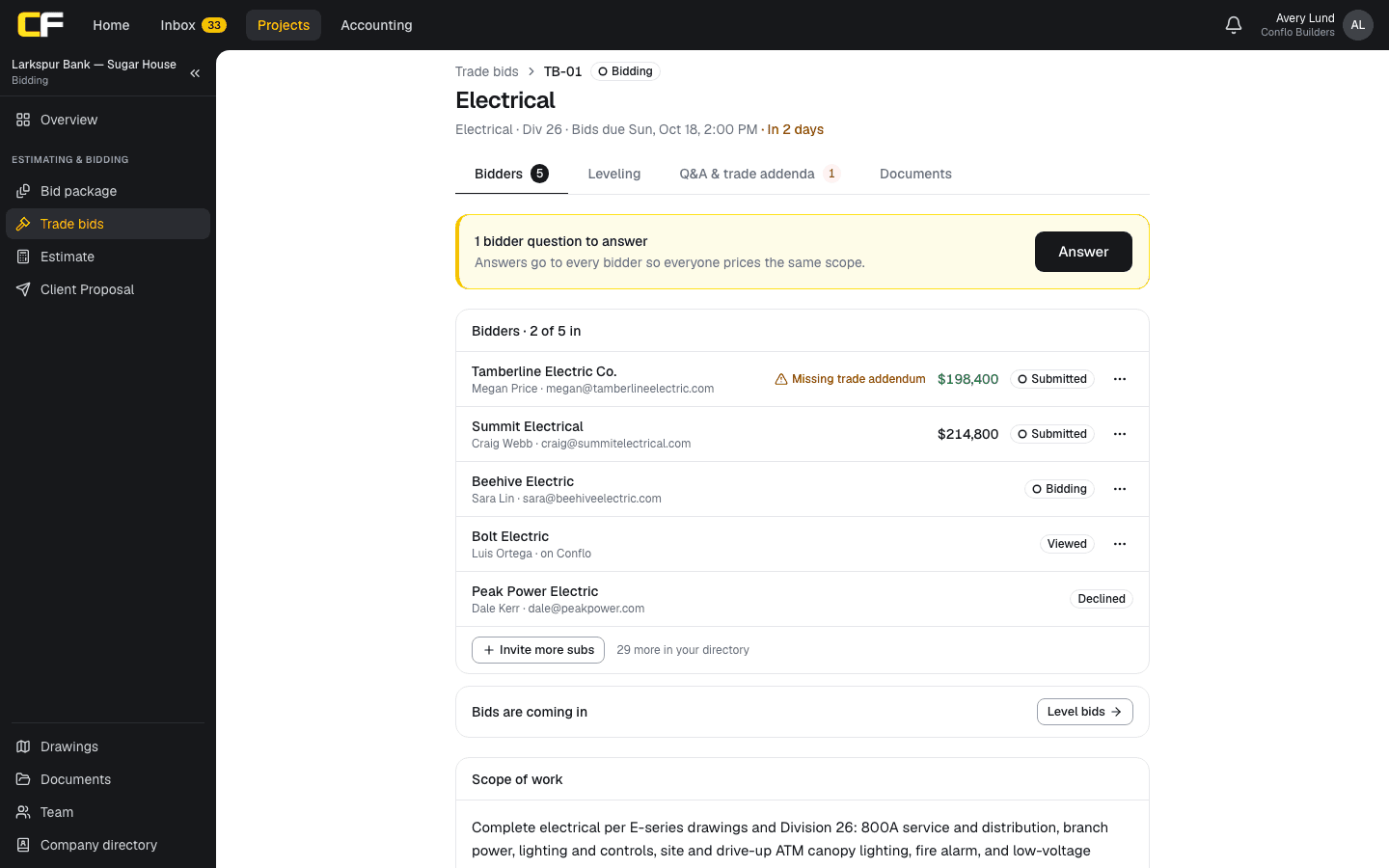
Not built today: a network of subs you have not worked with, sub prequalification questionnaires, and forwarding invitations from other systems into a sub's board.
The bottom line
If your problem is finding enough bidders, BuildingConnected's network is the stronger tool and Conflo does not try to replace it. If your problem is that bids, awards, subcontracts and pay apps live in different places, Conflo keeps them on one job, with prices you can read before you call anyone.
Check both pricing pages on the day you decide: prices and plans change, and this page says when it was last checked.
Sources
- BuildingConnected: Bid Management Software — Autodesk. Read October 16, 2026.
- BuildingConnected Pricing — Autodesk. Read October 16, 2026.
- Bid Board Pro Product Tour — Autodesk. Read October 16, 2026.
- BuildingConnected Glossary of Terms (Internet Archive copy, September 5, 2025) — BuildingConnected (Autodesk). Read October 17, 2026.
Questions
Is Conflo a replacement for BuildingConnected?
For sending bids to subs you know, leveling them and carrying the award into the job, yes. For finding new bidders on a large network or prequalifying subs with questionnaires, no: Conflo has neither.
How much does BuildingConnected cost?
Autodesk does not publish a price. Its pricing page lists BuildingConnected Pro, Bid Board Pro and TradeTapp, each with Request a Quote, and mentions user, project and account-based pricing.
Do subcontractors pay to bid in Conflo?
No. Subcontractors, suppliers, owners and architects are always free in Conflo; only the general contractor pays, by active project.
Do bidding jobs count against a Conflo plan?
No. A job you are still bidding never counts, and lost and passed bids do not either. A job counts against the plan from award, and there is no limit on how many you bid.
Can I find new subcontractors in Conflo?
Not through a network. You invite subs from your own directory or add a company and its contact by email; the sub joins free through the invitation link.
Related
Bidding
How Do You Level Subcontractor Bids?
Level subcontractor bids by pricing every scope gap, exclusion and missing addendum so each bid covers the same work, then compare the leveled totals.
· 9 min read
Money
How Does a Subcontractor Fill Out a Pay Application?
A subcontractor's pay app bills percent complete and stored materials per schedule-of-values line, less retainage and prior payments, with a lien waiver.
· 9 min read
Money
How Do You Price a Change Order?
Price a change order from direct cost (burdened labor, materials, equipment, sub quotes), then the markups and time your contract allows. Worked example.
· 9 min read
Role hub
The General Contractor's Guide: Bid to Closeout
What a general contractor is responsible for at every phase of a commercial job, from bidding and buyout to RFIs, change orders, pay apps and closeout.
· 8 min read