
Revise and Resubmit: What Should a Sub Do Next?
By Wyatt Cooper · Published · 6 min read
Key takeaways
- Revise and resubmit means the submittal is not approved: do not fabricate, order or install that item until the next revision is approved.
- Read every reviewer comment, including the GC's, and list them before you change anything.
- Answer each comment in a short response letter, cloud or mark every change, and resubmit under the same submittal number as the next revision.
- If a comment changes the contract scope or price, say so in writing when you resubmit, before you do the extra work.
When a submittal comes back revise and resubmit, stop: it is not approved, so do not order, fabricate or install that item. List every reviewer comment, fix each one in the drawings or product data, mark what changed, and write a short response answering each comment. Resubmit it as the next revision under the same number, and flag in writing any comment you believe changes your scope or price.
What revise and resubmit means
A submittal is returned with one of a few actions. The federal guide specification is a clear public model: "approved" lets you proceed; "approved as noted" lets you proceed "provided that the Contractor takes no exception to the corrections"; and "not approved," "disapproved," or "revise and resubmit" mean the submittal is incomplete or does not comply, so you "resubmit with appropriate changes" and do not proceed with the work "until the resubmittal is approved" (UFGS 01 33 00, §1.12.1). Your project's stamp may use other words; read its legend.
| Action | Can you proceed? | What you do next |
|---|---|---|
| Approved | Yes | Release for fabrication or order |
| Approved as noted | Yes, following the notes | Build to the notes; resubmit only if the stamp asks |
| Revise and resubmit | No | Fix every comment and resubmit as the next revision |
| Rejected | No | Often a different product or a new submittal; some stamps, including the federal model, treat "not approved" the same as revise and resubmit |
For how the first one should have been put together, see how to prepare a submittal; for the reviewer's side, how to review a submittal. Where submittals sit in a sub's whole job: the subcontractor's guide and the project lifecycle.
Step by step: the second round
- Read the whole returned package: the architect's or engineer's comments, the GC's comments and any marks on the drawings.
- List every comment, numbered, in one place. Call the reviewer about any you do not understand before you redraw.
- Fix each one in the shop drawings or product data. Cloud the changes on drawings and mark the changed pages of product data.
- Write a one-page response: each comment, then what you changed and where, or why you did not.
- Check that the fix does not break something else: dimensions, other trades' work, the schedule.
- Send it back through the GC as the next revision of the same submittal, with the response on top.
- Track the new review clock. The return date resets when you resubmit.
The time is usually yours. UFGS 01 33 00 makes the contractor responsible "for additional time required for Government reviews resulting from required resubmittals" and gives each resubmittal the same review period as the first (UFGS 01 33 00, §1.11). On a job with a two-week review period, every extra round adds at least two weeks, so the second round is where to be thorough.
When a comment changes your scope
Sometimes a reviewer's comment asks for something the contract documents did not: a heavier gauge, a different finish, an added component. Do not quietly absorb it. The federal model has the contractor give notice under the changes clause if it considers a correction on a returned submittal to be a change to the contract drawings or specifications (UFGS 01 33 00, §1.13). Put the same flag in your response letter and send the GC a change order request before you build it.
The reverse also holds: if your resubmittal deviates from the documents, say so in writing. The federal shop drawing clause has the contractor describe variations "in writing, separate from the drawings, at the time of submission", and says approval does not relieve the contractor "from responsibility for any errors or omissions in such drawings" (FAR 52.236-21).
A worked example: a fictional storefront submittal
The sub is fictional: a glazing contractor on a retail building. Its storefront shop drawings come back revise and resubmit with four comments. Its response letter is below.
Submittal 08 41 13-002, Revision 1: response to review comments
- Comment 1 (architect)
- Show the sill flashing end dams. Response: added detail 4 on sheet SD-3, clouded.
- Comment 2 (architect)
- Mullion spacing at bay C does not match the elevation. Response: corrected to 5'-0" on sheet SD-2, clouded.
- Comment 3 (engineer)
- Provide wind load calculations. Response: calculations stamped by our engineer attached as pages 9 to 14.
- Comment 4 (architect)
- Change finish to dark bronze. Response: the specification calls for clear anodized; dark bronze is a change. Revised drawings show dark bronze; change order request COR-07 sent to the GC with this resubmittal.
- Changed pages
- SD-2, SD-3; calculations added
- Unchanged
- SD-1, SD-4, product data
Every comment has an answer, the changes are clouded so the reviewer can find them in minutes, and the one comment that adds cost is flagged with its own change order request rather than buried.
How it works in Conflo
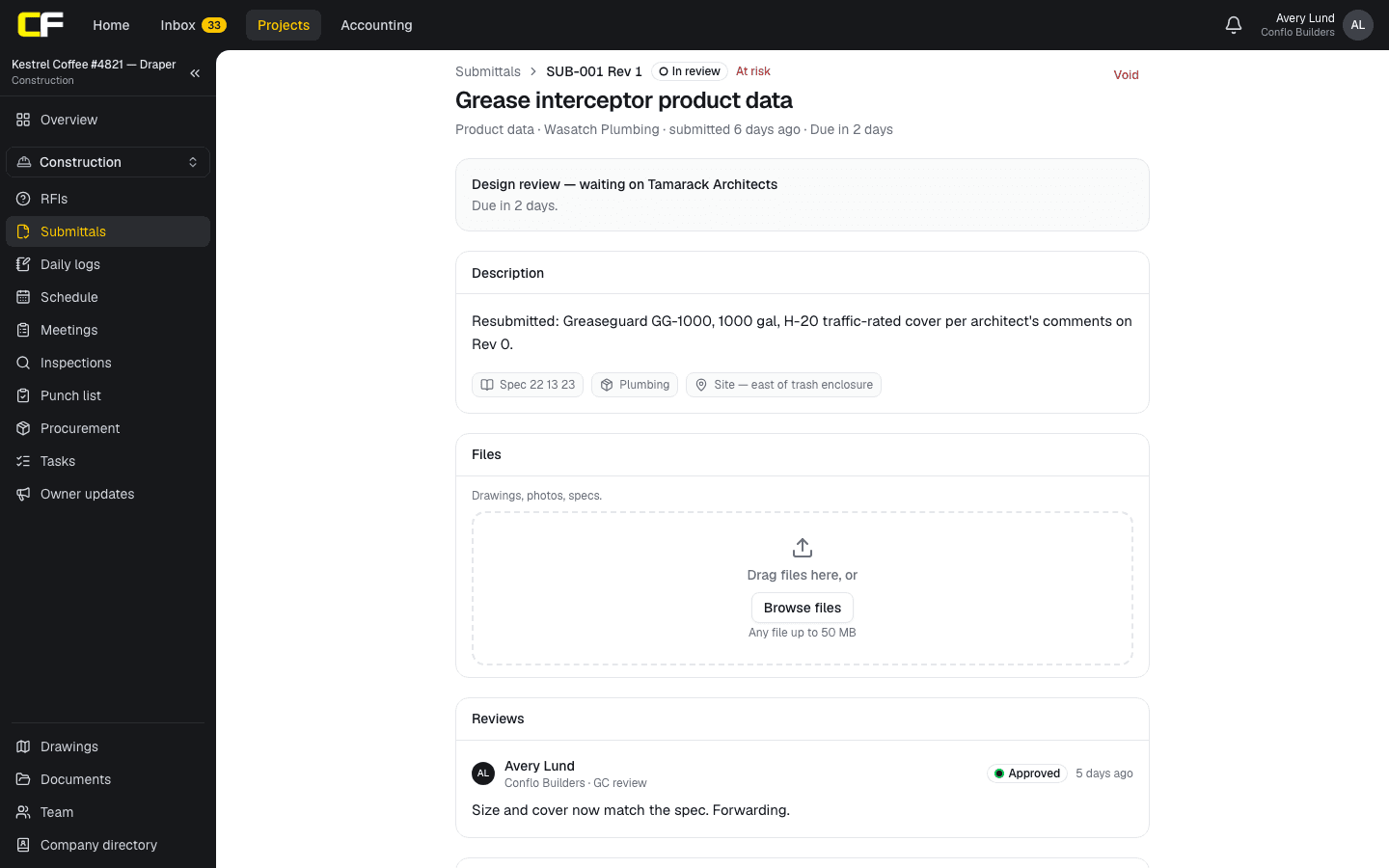
In Conflo's submittals tool, the GC returns a reviewed submittal to the sub who prepared it, with each reviewer's decision and comments. When the outcome is revise and resubmit, the sub or the GC's manager starts the next revision: a new draft under the same submittal number, its revision number one higher, linked to the one before, with the same reviewers ready for the new round.
When it is sent again, a new review clock starts, and the log shows whose court the ball is in. A subcontractor sees only its own company's submittals. Conflo is free for subcontractors and suppliers.
The bottom line
Revise and resubmit is a stop, not a suggestion. List every comment, fix and mark each one, answer them in a short letter, and resubmit as the next revision under the same number.
Flag any comment that changes your scope before you build it, and get the second round right so there is no third.
Sources
- UFGS 01 33 00 Submittal Procedures (August 2026), §1.11, §1.12.1 and §1.13 — Whole Building Design Guide, USACE / NAVFAC / AFCEC. Read October 22, 2026.
- FAR 52.236-21, Specifications and Drawings for Construction — Acquisition.gov, U.S. General Services Administration. Read October 22, 2026.
Questions
What does revise and resubmit mean on a submittal?
The submittal is not approved. It is incomplete or does not meet the contract documents, so you correct it and send it again, and you do not fabricate or install that item until the new revision is approved.
Is revise and resubmit the same as rejected?
Not always. On many stamps, revise and resubmit means fix the comments and send it again, and rejected means the product or approach is not acceptable and a different submittal is needed. Some specifications, including the federal model, treat "not approved" and "revise and resubmit" as one action. Check your project's stamp legend.
Does a resubmittal get a new number?
Usually it keeps the same submittal number with the next revision number, so the log shows its history. Your specification or the GC's log sets the format.
Who pays for the delay from a resubmittal?
Usually the party that submitted, unless the comment was a change. Many specifications give each resubmittal a full review period and make the contractor responsible for the extra time.
What if I disagree with a reviewer comment?
Say so in your response letter with the specification section or drawing that supports you, and talk to the GC before you resubmit. If the comment adds work, send a change order request.
Related
Construction
How Does a Subcontractor Prepare a Submittal?
How a subcontractor prepares a submittal the GC and architect can approve the first time: what to include, how to mark it up, deviations, and resubmittals.
· 9 min read
Construction
How Do Architects and Engineers Review a Submittal?
How the design team reviews a submittal: what the review covers and what it doesn't, choosing the review code, writing comments, and returning it on time.
· 8 min read
Definition
What Is a Submittal in Construction?
A submittal is what the contractor sends the design team to show how it will meet the specs: shop drawings, product data, samples. Types and an example.
· 4 min read
Money
How Does a Subcontractor Write a Change Order Request?
A sub's change order request: notice first, then scope, priced direct cost, your markup, days and backup the GC can pass to the owner. Worked example.
· 9 min read
Role hub
The Subcontractor's Guide: Bidding to Getting Paid
Every step of a commercial job from the subcontractor's seat: bidding, the subcontract, submittals, RFIs, change orders, pay apps, retainage and closeout.
· 9 min read