
Free Submittal Log Template (Excel)
By Wyatt Cooper · Published · 4 min read
Key takeaways
- The log has one row per required submittal, with its spec section and paragraph, type, who prepares and reviews it, and whether it needs approval or is for information.
- Enter the required-on-site date, lead time and review time, and the sheet works out approve-by and submit-by; sort by submit-by for your submittal schedule.
- Five filled-in example rows on a made-up job show how it reads; delete them before you start.
This free submittal log template is an Excel workbook with one row per required submittal: number and revision, spec section and paragraph, title, type, who prepares and reviews it, the schedule activity it holds up, dates sent and returned, review code and ball in court. Enter when each item is needed on site, its lead time and the review time, and it calculates the approve-by and submit-by dates. Download it below; no email needed.
Submittal log template (Excel)
Download (XLSX, no email needed)What is in the workbook
- Submittal log: 21 columns and 200 ready rows, with drop-down lists for type, action or information, and review code, and a filter on every column.
- Formulas in the shaded columns: approve by (required on site minus lead time), submit by (approve by minus review time) and days in review (from the date sent until it is returned, or today).
- Review codes: approved, approved as noted, revise and resubmit, rejected and received for information, with what each one lets the contractor do.
- How to use: the steps below, in the file.
How to fill it in
- Go through the specifications section by section. In each section's Part 1, find the Submittals article and add one row for each item it lists.
- Fill in the spec section and paragraph, the title, the type, who prepares it and who reviews it. Mark information-only items as Information.
- For each action item, enter the date the material must be on site, the supplier's lead time and the review time your Division 01 allows, in calendar days.
- Sort by submit-by: that is your submittal schedule. Send it to the architect and give each sub its rows.
- As submittals move, enter the dates sent and returned, the review code and the ball in court. Add a resubmittal as a new row with the same number and the next revision.
Your contract probably requires the schedule: under AIA A201–2017 §3.10.2, the contractor submits a submittal schedule promptly after award, coordinated with the construction schedule. Federal jobs call the log a register, and UFGS 01 33 00 warns that a register the government supplies "may not be all-inclusive", so check the list against the specs whoever made it. The full method, with a worked example of the dates, is in how to set up a submittal log.
How it works in Conflo
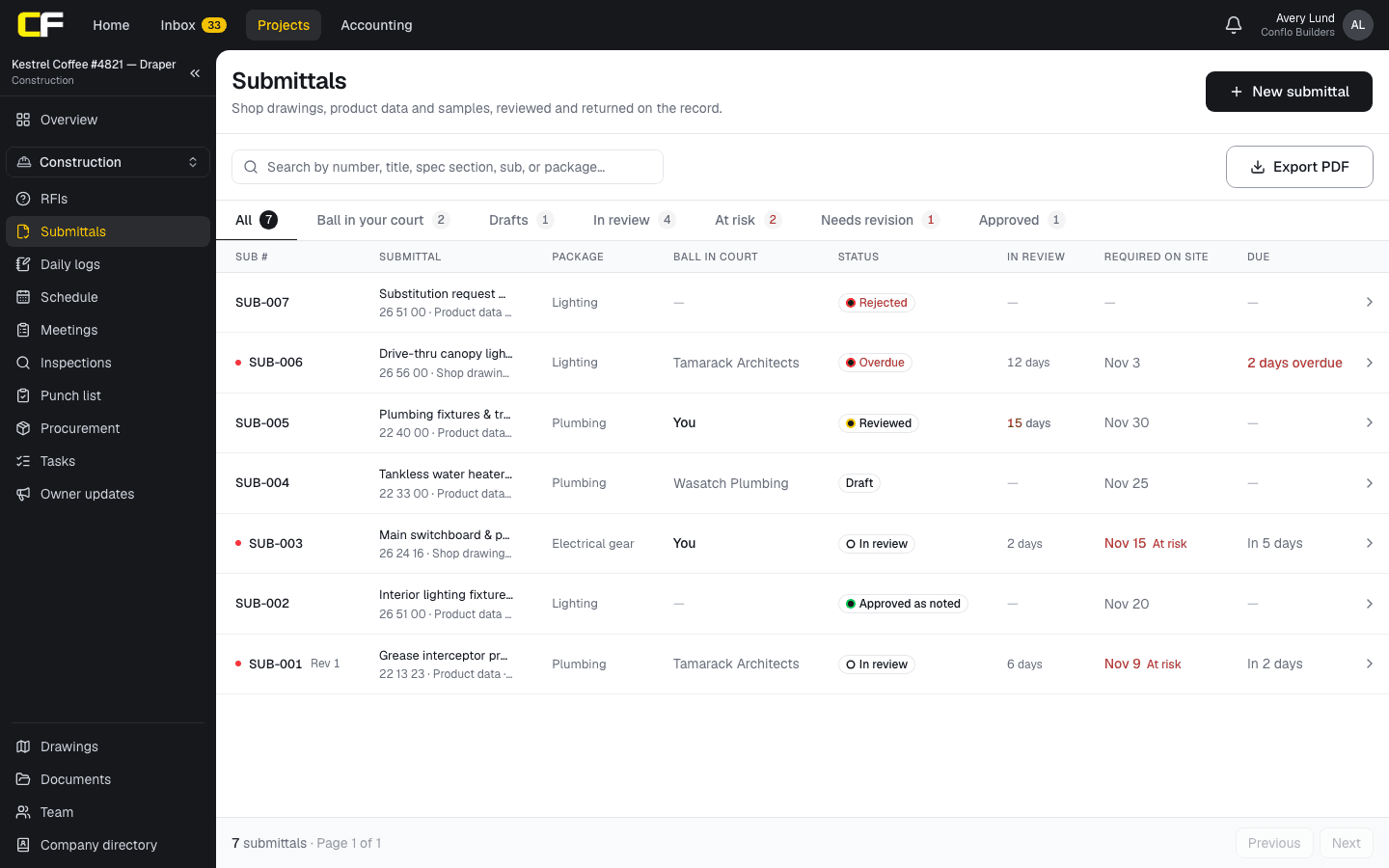
In Conflo's Submittals tool, each row is a submittal with its spec section, type, package, the sub who prepares it, the required-on-site date and the lead time. Conflo works out the approve-by date and flags the ones at risk, shows whose court each one is in, and keeps every revision under the same number. You add each item yourself; Conflo doesn't read the spec book.
The bottom line
Download the workbook, delete the example rows, and build your log from the spec book one Submittals article at a time. Sort by submit-by and you have your submittal schedule.
When the spreadsheet gets passed around by email, put the log where the GC, subs and design team all see the same one. Read what a submittal is, or how subs prepare one.
Sources
- Summary: A201–2017, General Conditions of the Contract for Construction — AIA Contract Documents. Read October 17, 2026.
- UFGS 01 33 00 Submittal Procedures (August 2026), §1.9 — Whole Building Design Guide, USACE / NAVFAC / AFCEC. Read October 16, 2026.
Questions
Is this submittal log template free?
Yes. It is a free Excel file with no email address asked. It opens in Excel and in most spreadsheet apps that read .xlsx files.
How does the template calculate the submit-by date?
Approve by is the required-on-site date minus the lead time. Submit by is the approve-by date minus the review time. For panelboards needed February 15 with a 70-day lead time and 14 days of review, approve by is December 7 and submit by is November 23.
What if my specs count review time in working days?
Convert it to calendar days before you enter it: the sheet's date math counts calendar days. Ten working days is usually fourteen calendar days, more over a holiday.
Related
Preconstruction
How Do You Set Up a Submittal Log From the Specs?
Build a submittal log from the specs: one row per required item, section by section, with approve-by and submit-by dates worked back from the schedule.
· 10 min read
Definition
What Is a Submittal in Construction?
A submittal is what the contractor sends the design team to show how it will meet the specs: shop drawings, product data, samples. Types and an example.
· 4 min read
Construction
How Does a Subcontractor Prepare a Submittal?
How a subcontractor prepares a submittal the GC and architect can approve the first time: what to include, how to mark it up, deviations, and resubmittals.
· 9 min read
Template
Free Three-Week Look-Ahead Schedule Template
A free three-week look-ahead schedule template in Excel: last week plus three weeks by day, crews, critical work and what must be ready. No email needed.
· 3 min read
Role hub
The General Contractor's Guide: Bid to Closeout
What a general contractor is responsible for at every phase of a commercial job, from bidding and buyout to RFIs, change orders, pay apps and closeout.
· 8 min read