
Free Punch List Template (Excel)
By Wyatt Cooper · Published · 4 min read
Key takeaways
- The template has one row per punch item with the fields that let a sub find, fix and prove it: location, description, company, trade, priority, photo, dates and status.
- Status is a drop-down (open, in progress, ready for review, closed), and the header counts each status for you.
- Close a row only after you have checked the fix; the sub's date and yours are separate columns for that reason.
This free punch list template is an Excel sheet with one row per item: location, a description of what is wrong and what done looks like, the responsible company and trade, priority, a photo reference, the date found, the due date, a status drop-down, and the dates the item was marked fixed and verified. The header counts open, in-progress, ready-for-review and closed items. Download it with no email address.
Punch list template (Excel)
Download (XLSX, no email needed)What is in the template
- A header for the project, the area or floor, the walk date and who walked it.
- A status count that updates as you change each row's status, and a total.
- Columns for the item number, location, description, responsible company, trade, priority (high, medium, low), photo reference, date found and due date.
- A status drop-down: open, in progress, ready for review, closed.
- Separate columns for the date the sub marked the item fixed, the date the GC verified it, and who verified it, plus notes.
- Two hundred numbered rows, a frozen header and a filter on every column, set to print landscape. One example row shows how a line reads; overwrite or delete it.
How to fill it in
- Use one sheet per area or floor, and fill in the header before the walk.
- Walk each room in the same order (door, walls clockwise, ceiling, floor, fixtures) and write one row per problem, with the room number from the drawings and where in the room.
- Describe what is wrong and what done looks like: "Nail pops, two places; patch and repaint the wall", not "fix wall".
- Name the company that fixes it, not "GC", and give each item a real due date agreed with that company.
- Note the photo's file name in the photo column so the photo and the row stay together.
- Filter by company and send each sub only its rows.
- When a sub says an item is fixed, set it to ready for review and enter the date; close it, with your date and name, only once you have checked it. If it is still wrong, set it back to open and say why in the notes.
For the full method, from the first area walk to the owner's inspection, see how to build a punch list. For what the term means and where it sits in closeout, see what a punch list is.
Where the list fits in closeout
On AIA-based contracts, the contractor prepares the list of items to be completed or corrected and the architect verifies and amends it when inspecting for substantial completion; the list is attached to the certificate with the time allowed to finish it (AIA's G704 summary). On federal work, the contractor keeps its own inspection system and corrects rejected work without charge (FAR 52.246-12). Either way, your list should be nearly closed before the owner walks. The list sits alongside the closeout package, and final payment usually waits for both.
When a spreadsheet stops working
A spreadsheet works for one superintendent on one job. It strains when several people edit copies, when photos live on one phone, and when each sub needs its own filtered list sent again after every change. If the same list is in a notebook, an email and a spreadsheet, nobody knows which is current.
How it works in Conflo
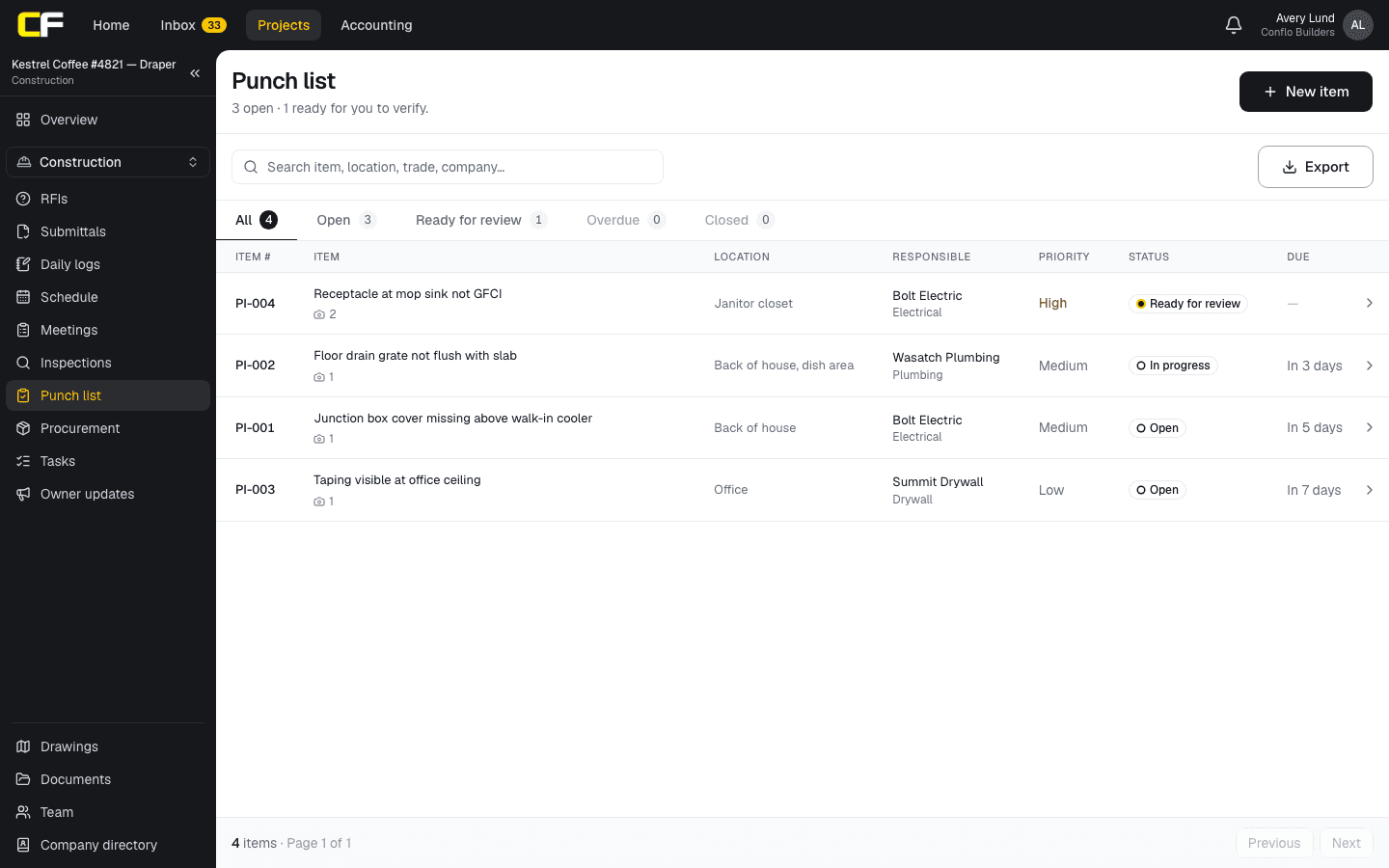
Conflo's punch list has the same fields as the template, on the record everyone shares: the GC logs each item with its location, company, priority, due date and an optional photo; each sub sees only its own items and marks them fixed with a photo or a note; only the GC closes an item or sends it back with the reason, and each send-back is counted.
The bottom line
The template gives every punch item the fields a sub needs to find, fix and prove it, and a status count you can read at a glance.
Use it for your next area walk; when the list outgrows one person's spreadsheet, join the waitlist for Conflo.
Sources
- Summary: G704–2017, Certificate of Substantial Completion — AIA Contract Documents (The American Institute of Architects). Read October 16, 2026.
- FAR 52.246-12, Inspection of Construction — Acquisition.gov, U.S. General Services Administration. Read October 16, 2026.
Questions
Is the punch list template free?
Yes. Download the Excel file with no email address. It opens in Excel, and in other spreadsheet programs that read .xlsx files.
What columns should a punch list have?
At least the location, a description, the responsible company, a photo, a due date and a status. Priority, the trade, and separate dates for marked fixed and verified make it easier to manage.
Can I use it for residential work?
Yes. The fields are the same for a remodel or a new home: room, what is wrong, who fixes it, by when, and whether it has been checked.
Related
Closeout
How Do You Build a Punch List?
Build a punch list by walking the job room by room before substantial completion, logging each item with location, trade, photo and due date. With example.
· 9 min read
Definition
What Is a Punch List in Construction?
A punch list is the list of work still to be completed or corrected once a building is substantially complete. What goes on it, who writes it, an example.
· 3 min read
Closeout
How Do You Assemble a Construction Closeout Package?
A closeout checklist by spec section and company: O&M manuals, as-builts, warranties, attic stock, training, lien waivers. Build it at buyout. Example.
· 9 min read
Role hub
The General Contractor's Guide: Bid to Closeout
What a general contractor is responsible for at every phase of a commercial job, from bidding and buyout to RFIs, change orders, pay apps and closeout.
· 8 min read