
Free Bid Management Software for Subcontractors
By Wyatt Cooper · Published · 6 min read · Last checked
Key takeaways
- Most free bid software for subs is free because the general contractor or the sub's upgrade pays, so check what the free version leaves out.
- Conflo is free for subcontractors on every GC's project, with one Bids board across every GC that uses it; it only shows invitations sent through Conflo.
- PlanHub offers subs a free profile for direct invitations within a local radius and publishes its paid plans, starting at $1,999 a year.
- BuildingConnected has a free Bid Board that receives invitations and submits bids; Bid Board Pro, the paid upgrade, is priced by quote.
Subcontractors can manage bids free in Conflo, where subs never pay and one Bids board lists every invitation from every GC on Conflo with a win rate; on PlanHub, whose free profile receives direct invitations within a local radius; on BuildingConnected's free Bid Board, for GCs who invite through it; or in a spreadsheet bid log. Bid Board Pro, BuildingConnected's paid upgrade, is priced by quote. No free tool collects invitations from every source, so most subs still keep one master log.
What a sub needs from bid software
A sub's bidding problem is volume and deadlines: invitations from many GCs, each with its own due time, drawings, addenda and questions. Whatever you use has to answer five questions on any morning:
- What is due this week, and which GC is it for?
- Has every addendum been seen and priced?
- Which questions are still open with the GC?
- Which bids are out, and for how much?
- Which ones did we win, and what is our hit rate?
The free options compared
| Conflo | PlanHub free profile | BuildingConnected | Spreadsheet bid log | |
|---|---|---|---|---|
| Price to the sub | Free on every GC's project. Only the GC pays. | Free profile; Premier is $1,999 a year (50 miles), $2,349 (100 miles) or $3,299 (200 miles). | Free Bid Board: accept and submit bids, open project files, message GCs. Bid Board Pro, the paid upgrade, is Request a Quote. | Free. |
| Where invitations come from | GCs who send their bids through Conflo. | Direct invitations from GCs, and projects within a local radius. | GCs who invite through BuildingConnected; Bid Board Pro adds forwarding from other sources. | Wherever you type them in. |
| Q&A and addenda | Ask on the invitation; answers go to every bidder; addenda must be acknowledged before you submit. | Not described on the pricing page. | Not described on the pricing page. | By email. |
| Your bid | Base bid, each scope item included or excluded, alternates, exclusions and qualifications, revisable until the due time. | Not described on the pricing page. | Not described on the pricing page. | Your own proposal, by email. |
| Tracking and win rate | One Bids board: needs your bid, waiting on a result, win rate and won. | Not described on the pricing page. | Bid Board Pro lists bid analytics and reporting. | Whatever columns you keep. |
Conflo: free for subs, one board across GCs
In Conflo, the general contractor pays and the subcontractor never does (see pricing). When a GC invites you, the email links straight to the invitation; if you have no account yet, the link sets up a free one. You see only your own invitation, ask questions there, and submit a structured bid that the GC levels by scope item. If you win, the subcontract arrives in Conflo to sign, and your pay apps bill against it.
The limit is reach. Conflo shows only invitations sent through Conflo; it does not list public projects or forward invitations from other systems.
PlanHub and BuildingConnected
PlanHub says a sub "can create a free profile to receive direct invitations from general contractors and bid on projects within a local radius"; searching a wider territory needs Premier (PlanHub pricing). BuildingConnected's pricing page lists Bid Board Pro for "Identify new job opportunities and track bids", with automated bid tracking, bid forwarding, company-wide views, calendar sync and analytics, priced by quote (pricing, Bid Board Pro tour). Under it sits the free Bid Board, which BuildingConnected's glossary describes as its "free tool for subcontractors" to "accept and submit bids, submit qualifications, access project files and message general contractors" (BuildingConnected glossary). If your GCs invite through BuildingConnected, the free board answers them; Pro is for tracking a whole office's bids from every source.
Keep one master bid log anyway
Because no free tool sees every invitation, keep one log of every bid you decide to price, wherever it came from. One row per bid: GC, project, trade or package, due date and time, latest addendum priced, amount, result. The hit rate is bids won divided by bids decided; leave out bids still waiting.
| Result | Bids | Share of decided bids |
|---|---|---|
| Won | 9 | 22.5% |
| Lost | 31 | 77.5% |
| Decided (won + lost) | 40 | 100% |
| Still waiting (not counted) | 6 | — |
9 ÷ 40 = 0.225, a 22.5% hit rate; 31 ÷ 40 = 77.5%, and the two add to 100%. Counting the six open bids would wrongly pull the rate down to 9 ÷ 46.
Choose BuildingConnected if…
- Most of the GCs you bid for send their invitations through BuildingConnected.
- You want invitations from many sources forwarded into one board, with calendar sync: Bid Board Pro offers this and Conflo does not.
- You want to find new projects to bid on a network, not only answer GCs who invite you.
How it works in Conflo
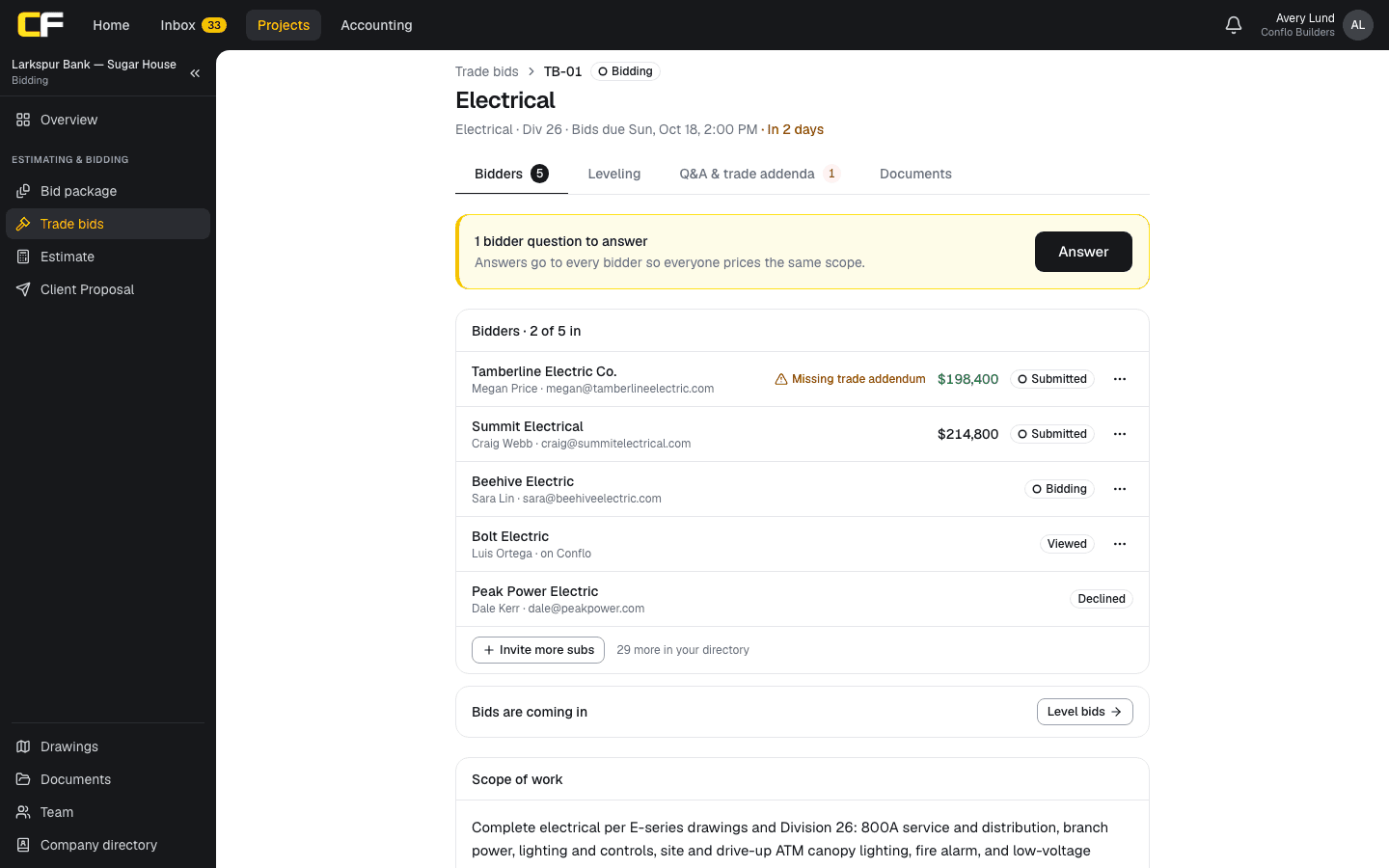
On a GC's Trade bids in Conflo, your invitation moves from invited to viewed, bidding, declined or submitted, and the GC sees that status. You can revise your bid while the package is open and before the due time; the latest submission replaces the earlier one. Your addendum acknowledgments, exclusions and alternates sit beside your number when the GC levels.
The bottom line
Free bid software for subs is real, but each free tool sees only part of your invitations: those from GCs on its platform, or within its radius. Use the free tools your GCs already send through, and keep one master log so nothing falls between them.
If the GCs you work for use Conflo, you bid, sign, bill and track retainage there free, with one login for every GC.
Sources
- BuildingConnected Pricing — Autodesk. Read October 16, 2026.
- Bid Board Pro Product Tour — Autodesk. Read October 16, 2026.
- Subcontractor Pricing — PlanHub. Read October 16, 2026.
- BuildingConnected Glossary of Terms (Internet Archive copy, September 5, 2025) — BuildingConnected (Autodesk). Read October 17, 2026.
Questions
Is there free bid management software for subcontractors?
Yes. Conflo is free for subs on every GC's project, PlanHub offers a free profile for direct invitations within a local radius, and a spreadsheet bid log costs nothing. Each covers only part of your invitations.
Is BuildingConnected free for subcontractors?
Yes, a free Bid Board lets subs accept and submit bids, submit qualifications, open project files and message GCs, per BuildingConnected's glossary. Bid Board Pro, the paid upgrade with bid forwarding, calendar sync and analytics, is priced by quote.
Do subcontractors pay for Conflo?
No. Subcontractors and suppliers are always free in Conflo; only the general contractor pays, and a sub keeps one login across every GC that uses it.
How do you calculate a bid hit rate?
Divide bids won by bids decided, won plus lost. Leave out bids still waiting on a result. Nine won out of forty decided is a 22.5% hit rate.
Related
Comparison
Conflo vs BuildingConnected for Bidding
Conflo and BuildingConnected compared for sending trade bids: who pays, published prices, leveling, the bidder network and what happens after award.
· 7 min read
Alternatives
BuildingConnected Alternatives for Sending Bids
Alternatives to BuildingConnected for sending trade bids, compared on who pays, published prices, bidder networks, leveling and what happens after award.
· 6 min read
Money
How Does a Subcontractor Fill Out a Pay Application?
A subcontractor's pay app bills percent complete and stored materials per schedule-of-values line, less retainage and prior payments, with a lien waiver.
· 9 min read
Role hub
The Subcontractor's Guide: Bidding to Getting Paid
Every step of a commercial job from the subcontractor's seat: bidding, the subcontract, submittals, RFIs, change orders, pay apps, retainage and closeout.
· 9 min read